Ads.txt and App-ads.txt: Common Formatting Errors Sapping Your Revenue
A single comma can silence an entire demand path. When a buyer's platform crawls your ads.txt file and fails to match the seller on the bid request, the buyer drops the bid, and the impression sells to whatever demand still recognizes the inventory, at whatever price that demand sets. Nothing alerts you at the moment it happens. In Ad Manager the damage surfaces later, under two labels: Unauthorized seller (Ads.txt) and Unauthorized seller in supply chain. Both can stop line items from spending.
We are an ad network, an SSP and an agency in one company, so every seller declaration reaches us from both ends: the file a publisher hosts, and the sellers.json record the buyer reconciles against it. OnlyMedia runs Google Ad Manager, AdX and MCM for thousands of publisher partners, each above one million monthly pageviews, and the same handful of file errors recurs across portfolios of every size. The sections below walk the record format field by field, then the errors we keep finding on web and in app, then an audit that catches them before the next crawl does.
How a formatting error kills a bid
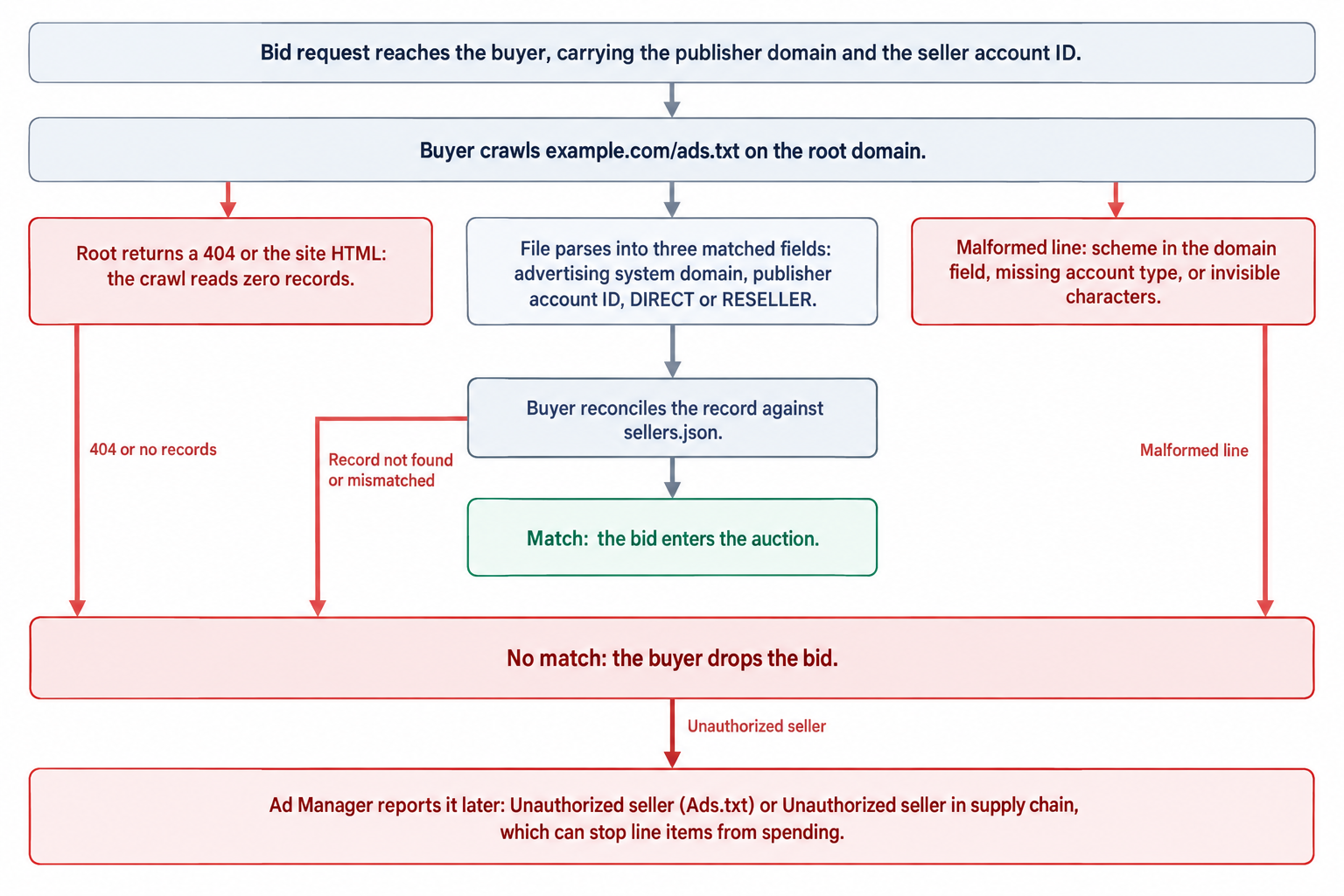
Buyers authorize sellers before they authorize prices. A DSP's platform runs the lookup before the auction logic: it fetches the plain text file on your root domain and matches three fields, the advertising system's domain, the publisher account ID on that system, and the account type. If the lookup fails, the seller reads as unauthorized and the bid dies before price enters the comparison.
Two Ad Manager error names describe the same failure from two angles. Unauthorized seller (Ads.txt) flags a seller the file never validly declared. Unauthorized seller in supply chain flags a declaration the buyer cannot reconcile with the seller's own records. Both can prevent line items from spending, which turns a stray character into a revenue event, and because buyers crawl on their own schedules, the recovery lags the fix by a crawl cycle, not a page load.
The record, field by field
The IAB ads.txt specification v1.1 defines each non-comment line as four fields: the advertising system's domain, the publisher account ID on that system, an account type of DIRECT or RESELLER, and an optional certification authority ID. Lines that start with a # serve as comments, and variable declarations use the key=value form. The file must live on the root domain, example.com/ads.txt, because buyers fetch from the apex. Version 1.1 added the OWNERDOMAIN and MANAGERDOMAIN variables, which give buyers transparency into seller relationships via sellers.json.
The third field deserves respect, because it tells the buyer what stands behind the account. DIRECT declares a direct business relationship between the site owner and the advertising system. RESELLER declares that the system resells the inventory through intermediaries, and the buyer then checks the chain of records behind that resale.
A clean pair of records, with illustrative IDs, shows the shape. The fourth field appears only when a partner issues a certification authority ID.
exchange-a.example.com, 8417, DIRECT
exchange-b.example.com, 4443z3, RESELLER, 3g7d6f9h1k
That is the entire grammar. Every loss we diagnose traces to a violation of it: a field that does not parse, an ID that does not match, or a domain the crawler cannot reach.
The eight web errors we keep finding
These fill most of our file review queues. None of them requires a bug in the ad server, and all of them cost money while the file sits there, apparently fine.
-
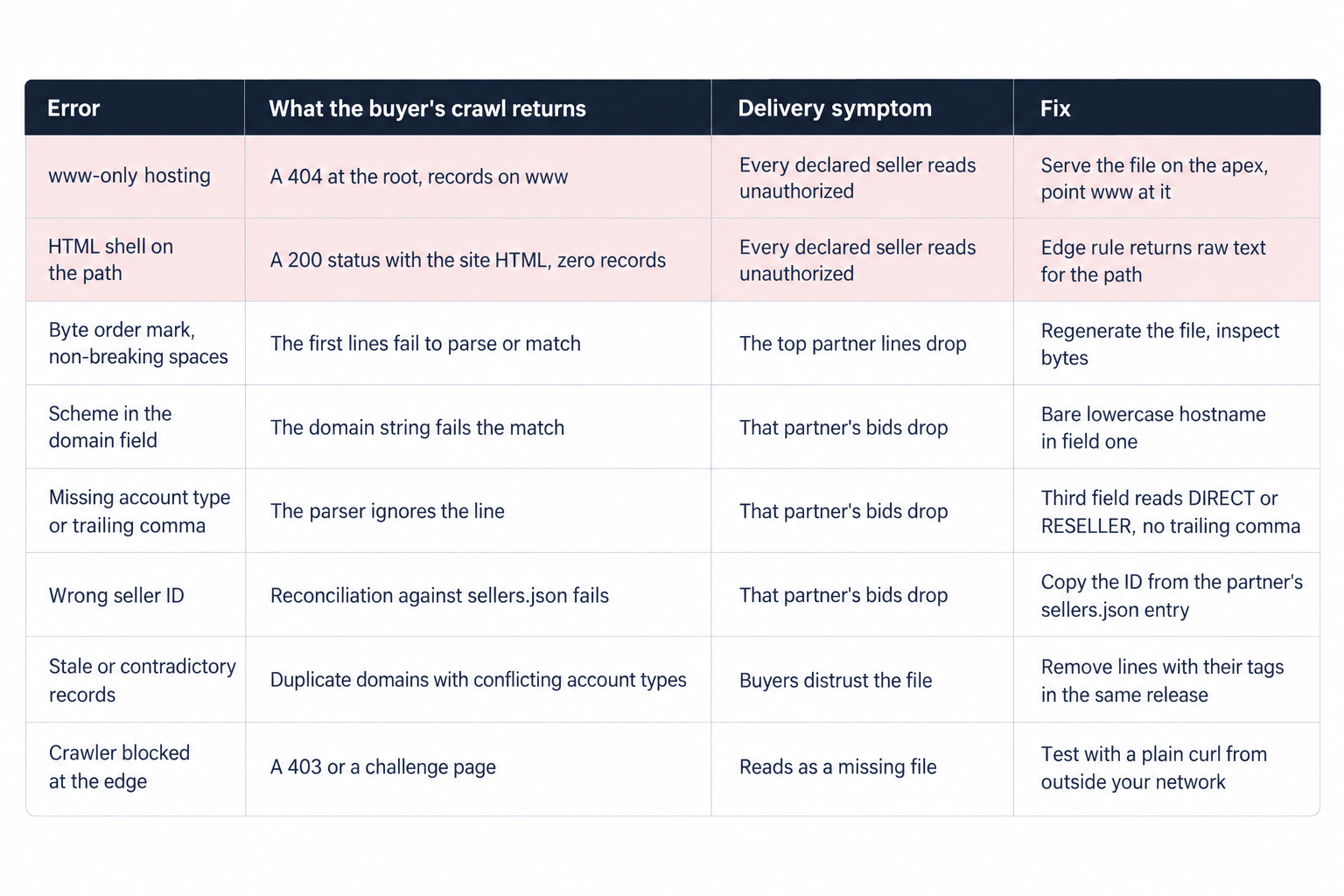
The file resolves on www but not on the root. Buyers fetch the apex: if example.com/ads.txt returns a 404 while www.example.com/ads.txt serves the records, the crawl reads an empty authorization set and every declared path reads as unauthorized. Fix it at the edge, by serving the file on the apex and pointing www at it. If you must host the file on a subdomain, the root file still has to exist, and it has to declare that subdomain with a subdomain= line.
-
A 200 that returns your site's HTML. Single-page app frameworks love catch-all routes, and a request for /ads.txt can return the app shell with a 200 status: the browser shows something, the crawler reads zero records. Check the response body, not just the status code. An explicit edge rule for the path fixes it in minutes.
-
Invisible characters from copy and paste. A byte order mark at the head of the file, non-breaking spaces inside IDs, curly quotes around comment text: the rendered page looks right and the bytes do not parse. The first line usually fails first, because the byte order mark attaches to the first domain field. Generate the file programmatically and inspect bytes, not renderings.
-
A scheme or a path in the domain field. The first field takes a bare lowercase hostname. A line that begins with https:// asks the buyer's parser to strip the protocol before comparing, and you should not depend on that generosity. Strip the scheme yourself.
-
A missing or mangled account type. The third field accepts exactly two values, DIRECT or RESELLER. A trailing comma creates an empty fourth field where the spec allows only a certification authority ID, and a missing third field invalidates the line outright. Three near misses, one parser verdict:
https://exchange-a.example.com, 8417, DIRECT
   exchange-b.example.com, 4443z3, RESELLER,
   exchange-c.example.com, 4443z3
The first line carries a scheme in the domain field, the second ends with a trailing comma, the third drops the account type. Each looks nearly right to a human and fails to a parser.
-
The wrong seller ID. The account ID must match what the advertising system publishes in its sellers.json for your account, because that is the number the buyer reconciles against. Publishers paste the site ID out of a tag snippet, or the account number from an invoice, and the match fails even though the partner relationship is real. Pull the ID from the partner's sellers.json entry, never from memory.
-
Stale and contradictory records. Old partners never removed, the same system listed twice with different account types, notes that forgot the # prefix and parse as records: none of these stop the crawl, but all of them hand the buyer a contradiction, and a contradiction is a reason to distrust the whole file. Remove lines in the same release that removes their tags, and add lines before new tags ship.
-
Crawlers blocked at the edge. Robots rules, WAF challenges and bot protection sometimes answer a buyer's crawler with a 403 or an interstitial, and then the file might as well not exist. Fetch the path with a plain curl and an unusual user agent, from outside your own network, and look at what actually returns.
Each of the eight shares one property: the file still loads for a human, so the break stays invisible until delivery data shows the gap. The comparison below compresses all eight into the crawler's point of view.
MCM: two lines stand between a child and AdX
MCM concentrates the whole problem into two declarations. Under Manage Inventory, each child publisher must host an ads.txt file that lists Google as RESELLER and the managing parent as DIRECT, and the seller ID in the file must match the publisher ID in Google's sellers.json. Three child-side mistakes dominate our queues: copying the parent's file wholesale, so the IDs describe the parent's accounts; swapping the two tags, so the parent reads as RESELLER; omitting the Google line entirely. Each mistake breaks the chain between the child's domain and the sellers.json entry the buyer reconciles against, and the AdX demand behind MCM goes quiet for that child.
We sell through this path daily. AdX via MCM, Prebid and OpenRTB seats compete in one unified auction per impression in our SSP, under managed floors, so a broken child file shows up as thinning bid density for one domain long before anyone thinks to read the file. That is why we verify both lines whenever a parent, a child or a domain changes, and why the check belongs in the same runbook step as the MCM approval itself.
Nobody upstream will stop you
No system validates the file on your behalf. The guidance at Google Ad Manager Help says it plainly: publishers are responsible for keeping their ads.txt and app-ads.txt files correct and up to date, and Google cannot prevent uploading a file that carries broken formatting or unlinked accounts. Ad Manager can host the file and show its crawl status, and the publisher still owns correctness. The reliable feedback loop is delivery.
Detection therefore belongs to ad operations, not to setup. Watch two labels in delivery diagnostics: Unauthorized seller (Ads.txt) and Unauthorized seller in supply chain. When revenue drops without a matching traffic story, read the affected line item's diagnostics for those labels before touching floors, prices or targeting. Our publisher reporting console updates every ten minutes, so a demand path going dark appears as a delivery dip within the hour, and we pay Net 30, CPM based, so the same dip lands in the next payment run if nobody acts first.
app-ads.txt: the store listing decides the domain
app-ads.txt extends the same mechanism to apps with one twist, and the twist generates most of the errors: the file lives on the developer's website domain, as the app store listing declares it, rather than inside the app itself. Buyers crawl the domain, not the package, so the store listing, not the SDK, decides where authorization happens. The failure points we see most:
-
An empty developer website field in the store listing. The buyer has no domain to crawl and the check simply finds nothing. Fix the listing first, then the file.
-
Different domains across stores. When the iOS listing and the Android listing declare different developer websites, one platform's app-ads.txt goes missing by definition, and in-app demand splits by store for no operational reason. Align the listings on one domain, or mirror the file on both.
-
A listing that points at a domain the app team does not control. Marketing owns the root, the app team wrote the file, and the two never met. Rebrands and acquisitions compound it: the listing still declares the pre-acquisition domain while the file moved on.
-
A file shipped inside the app. Buyers never open the package, they fetch the domain, so a bundled copy or an SDK sidecar authorizes nothing.
-
Web IDs standing in for in-app IDs. In-app seats carry their own seller IDs on each network, and the web file standing in as app-ads.txt fails reconciliation for every one of them. Build the file from the in-app partner list, not from the web file.
-
CTV apps following the same chain. Connected TV resolves through the same store listing to domain to file path, and the IAB Tech Lab's ads.txt hub tracks the guidance across web, mobile apps and CTV. Treat every CTV app as an app first: listing, then domain, then file.
Respect one operational wrinkle: propagation runs through the store's review queue, not your deploy pipeline. Correct the file first, then align the listing, and plan for the gap between the two changes. The publisher owns this side too, from the listing field to the last byte of the file.
An audit that fits in one maintenance window
Run the full audit monthly, and run the diff after every change that touches demand partners, domains or MCM structure. It prevents the quiet version of the revenue loss, the one where bids simply stop arriving.
-
Fetch the file the way buyers do:
curl https://example.com/ads.txtfrom outside your network, with a plain user agent, and follow redirects when you test, because buyers may not. Repeat the call against the www host and record what each returns: raw text, a 404, an HTML shell or a 403. -
Diff the file against the live demand list. Every seat you sell through needs a line, and every line needs a seat you actually sell through.
-
Reconcile every seller ID against the partner's sellers.json entry for your account. For Google inventory under MCM, the seller ID must match the publisher ID in Google's sellers.json.
-
Inspect the bytes before editing anything: a byte order mark and non-breaking spaces tell you the problem is encoding, not content.
-
Verify the two MCM lines on every child domain: Google as RESELLER, the managing parent as DIRECT, IDs matching sellers.json.
-
Add seats before tags ship. An OpenRTB seat or a Prebid bidder needs its seller ID in the file first, and our OpenRTB and VAST integration docs spell out the identifiers each seat sends.
-
Watch Ad Manager diagnostics for Unauthorized seller (Ads.txt) and Unauthorized seller in supply chain after every change, and treat any appearance as a regression to fix the same day, not an anomaly to monitor.
Generate the file from your demand stack's source of truth rather than editing it by hand. Most of the eight errors above enter a file through a human keyboard, and once generation handles the content, the audit shrinks to a diff plus a byte check.
A file worth automating
The spec fits on one page and the file fits in one HTTP response, which is exactly why the errors persist: nobody schedules time for something this small. The revenue logic disagrees. A demand path that stops bidding does not degrade gracefully; it stops, and the two Ad Manager labels say so long before the payment report does.
We build the verification into onboarding and into every partner change, for publishers above one million monthly pageviews. OnlyMedia pays Net 30, CPM based, with no sliding terms, so the money a recovered demand path earns arrives on a known schedule. The same standard runs our curated programmatic demand network: Net 30 payouts, and seller records a buyer can verify line by line.