Demystifying Bid Responses in oRTB: A Deep Dive for Ad Ops Professionals
An OpenRTB 2.6 bid response carries more monetization data than most ad ops teams ever read: the advertiser's domain for block list checking, the private marketplace deal the bid answers, the number of seconds a creative stays valid after the auction, and separate notice URLs for winning, losing, and billing. Most teams read the CPM and discard the rest, then lose days to discrepancies that the discarded fields would have explained in minutes.
We are OnlyMedia, an ad network, an SSP, and an agency in one company. We integrate OpenRTB 2.6 seats and Prebid, header and server-side, for thousands of publishers, each above one million monthly pageviews, and we reconcile the fields in every bid response against what actually bills. This article is that reconciliation written down: object by object, field by field, with the operational consequence attached to each.
The response object and the seatbid array
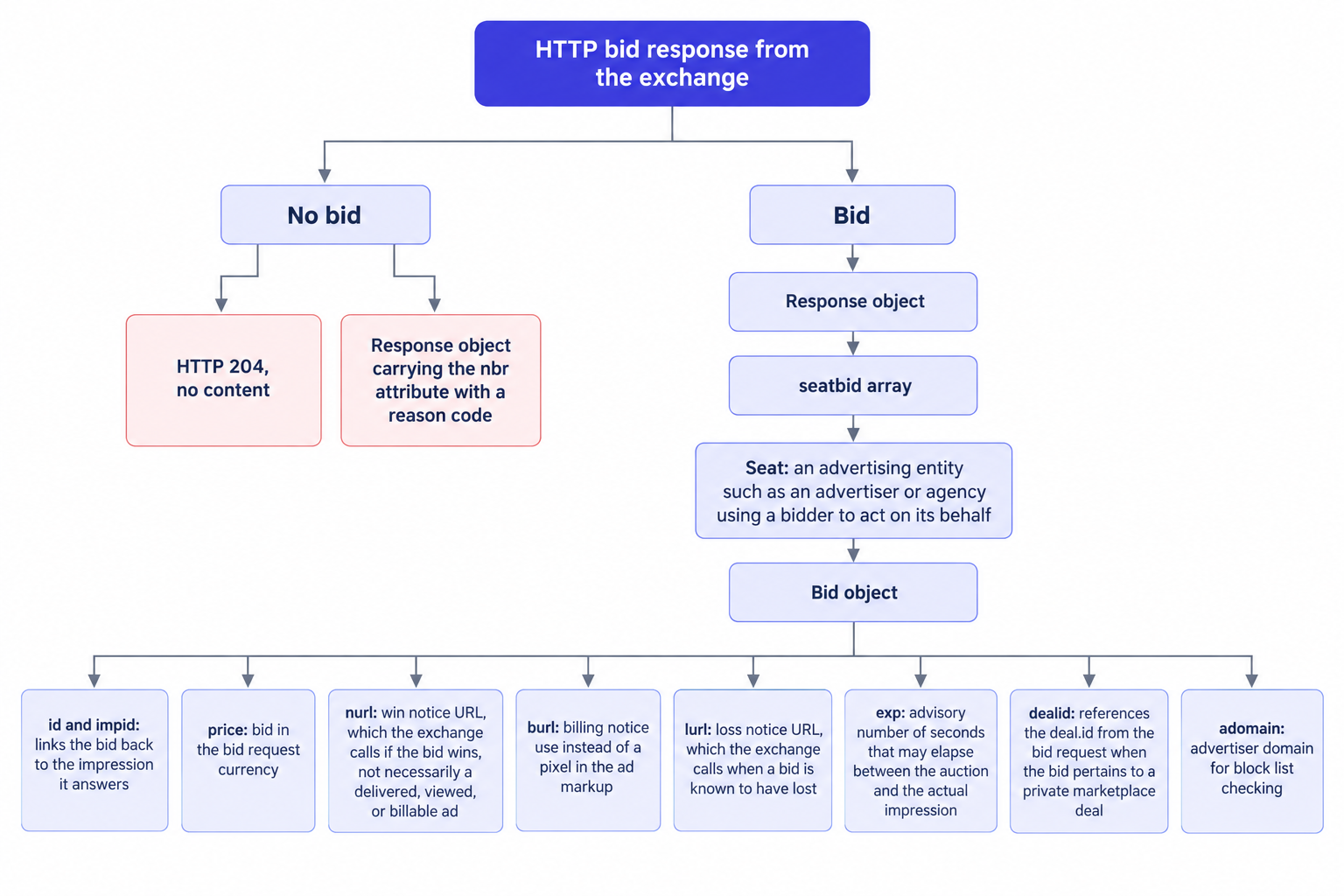
A bidder answers a bid request with an HTTP payload that contains a JSON response object. As the OpenRTB 2.6 specification defines it, the response groups bids into a seatbid array, and each seatbid element pairs a seat with the bids a bidder submits on that seat's behalf. The spec defines seat as the seat on whose behalf the bid is made, an advertising entity such as an advertiser or agency using a bidder to act on its behalf.
Read that definition twice, because it changes how you report demand. Seat and adapter are not the same thing. Nothing in the spec limits a response to one seatbid element: a single adapter can answer for several advertisers or agencies, one seatbid per seat, and a naive log keyed on adapter name collapses them together. Key your reconciliation by bidder plus seat instead, or you will attribute a seat's revenue to the wrong entity.
The seat also anchors accountability. When a creative violates a block list, a deal's terms, or a category rule, the seat names the advertiser or agency you hold to it, which is why seat-level logs pay for themselves the first time a buyer disputes a creative. Store the full response payload, not just the parsed CPM, because the fields you need during an audit are the ones nobody thought to parse in advance.
The six fields that carry the audit value
Every bid object carries an id and an impid that link the bid back to the impression object it answers, plus the price in the bid request's currency. Six further fields do most of the operational work:
- nurl: the win notice URL, which the exchange calls if the bid wins.
- burl: supports billing notice use instead of a pixel in the ad markup.
- lurl: the loss notice URL, which the exchange calls when a bid is known to have lost.
- exp: advisory as to the number of seconds that may elapse between the auction and the actual impression.
- dealid: references the deal.id from the bid request when the bid pertains to a private marketplace deal.
- adomain: the advertiser domain for block list checking.
Two of these fields settle billing disputes, two govern policy enforcement, and two explain the gap between what a bidder promises and what your ad server records. We take them in that order.
nurl fires on winning, not on delivering
The exchange calls nurl when the bid wins the auction, and that is all the call proves. The spec is explicit that a nurl call does not necessarily indicate a delivered, viewed, or billable ad: the creative can fail to render, load below the fold, or serve into a tab nobody opens. Treat nurl counts as one ledger, auction wins. Your ad server impression count is a second ledger. The buyer's billing count is a third. When a demand partner quotes a win rate that your ad server cannot corroborate, first ask which ledger each side counts, because both sides can be technically honest while disagreeing.
Win rate is therefore a weak KPI on its own. A partner can maximize nurl volume with aggressive bids on cheap, low-viewability placements and still deliver little billable value. Rank partners on their billing counts and on the revenue your ad server attributes to their seat, and keep nurl for explaining deltas between the two.
burl and lurl: the billing and loss ledgers
burl exists to support billing notice use instead of a pixel in the ad markup. In practice, a buyer who bills on burl counts an impression when their system registers the burl call, not when your ad server fires on the creative. Ask every demand partner for their billing basis before you reconcile an invoice, then run the comparison on that basis for the same period. The delta between their ledger and yours becomes a concrete number rather than an argument, and that is the entire point of the field.
lurl is the loss notice URL, which the exchange calls when a bid is known to have lost. Loss notices are raw material for floor work. When a partner can report the prices of its losing bids, a cluster of losses just under your floor means the floor is squeezing out demand that would otherwise clear, while losses far above your floor mean the floor is not the constraint and the problem lives elsewhere: creative approval, block list mismatches, or deal targeting that never matches your traffic. Either way, lurl volume per seat is the cheapest signal you have about why demand walks away.
exp: advisory in the spec, concrete in your reports
The exp field is advisory as to the number of seconds that may elapse between the auction and the actual impression. Advisory sounds optional until you run refresh units, sticky video players, or server-side caching. When the time between auction and render exceeds exp, the buyer's systems may treat the impression as stale while your ad server counts it, and that asymmetry surfaces later as a billing delta rather than as an error anyone sees live.
Check exp in two places. First, slot refresh: a unit that refreshes faster than a bidder's exp allows should either get a longer interval or should exclude that bidder from refresh traffic. Second, server-side caching: keep the lifetime you assign to stored bid responses at or under exp, because serving a bid the buyer considers expired manufactures discrepancies on purpose. Video inherits the same rule through your VAST cache, since a cached wrapper played after the advisory window is exactly the kind of impression that returns as a billing dispute.
adomain and dealid: where policy meets the response
adomain carries the advertiser domain for block list checking, and it is the enforcement point for every block list you run. Request-level blocking on categories and domains is a filter, not a guarantee: the response is where you verify what actually arrived. Wrap the creative, read adomain, and compare it against your block list and category rules on a sampling schedule. A block list that only filters requests never catches a miscategorized creative, and adomain in the response is the field that catches it after the fact.
dealid references the deal.id from the bid request when the bid pertains to a private marketplace deal. Audit it in two passes. Confirm that every winning bid tagged with a dealid maps to a deal you actually sold, matched by deal id rather than by name, because name collisions across buyers are common. Then read deal losses correctly: in a unified auction, a deal bid that loses to open demand is normal behavior, not a setup error, and forcing it into a protected lane costs you open market revenue. A deal that never bids at all is a setup error, so check its floors, its targeting, and the buyer-side seat mapping before you blame the demand.
No-bid semantics: HTTP 204 and the nbr code
The spec gives a no-bid two shapes. A bidder can return an HTTP 204 with no content, or a response object carrying the nbr attribute with a reason code.
Log the shapes separately, because they mean different things operationally. A 204 is a clean refusal: the bidder saw the request and declined to price it. An nbr code states a reason, and the spec's reason list separates technical refusals from price-based ones. A bidder that keeps returning a price-based refusal code against one placement is telling you where your floor sits relative to what it will pay, which is floor intelligence rather than an error. Read the reason list in the specification and map each code your partners actually use to an action, because the list exists so buyers can machine-communicate why they walked away.
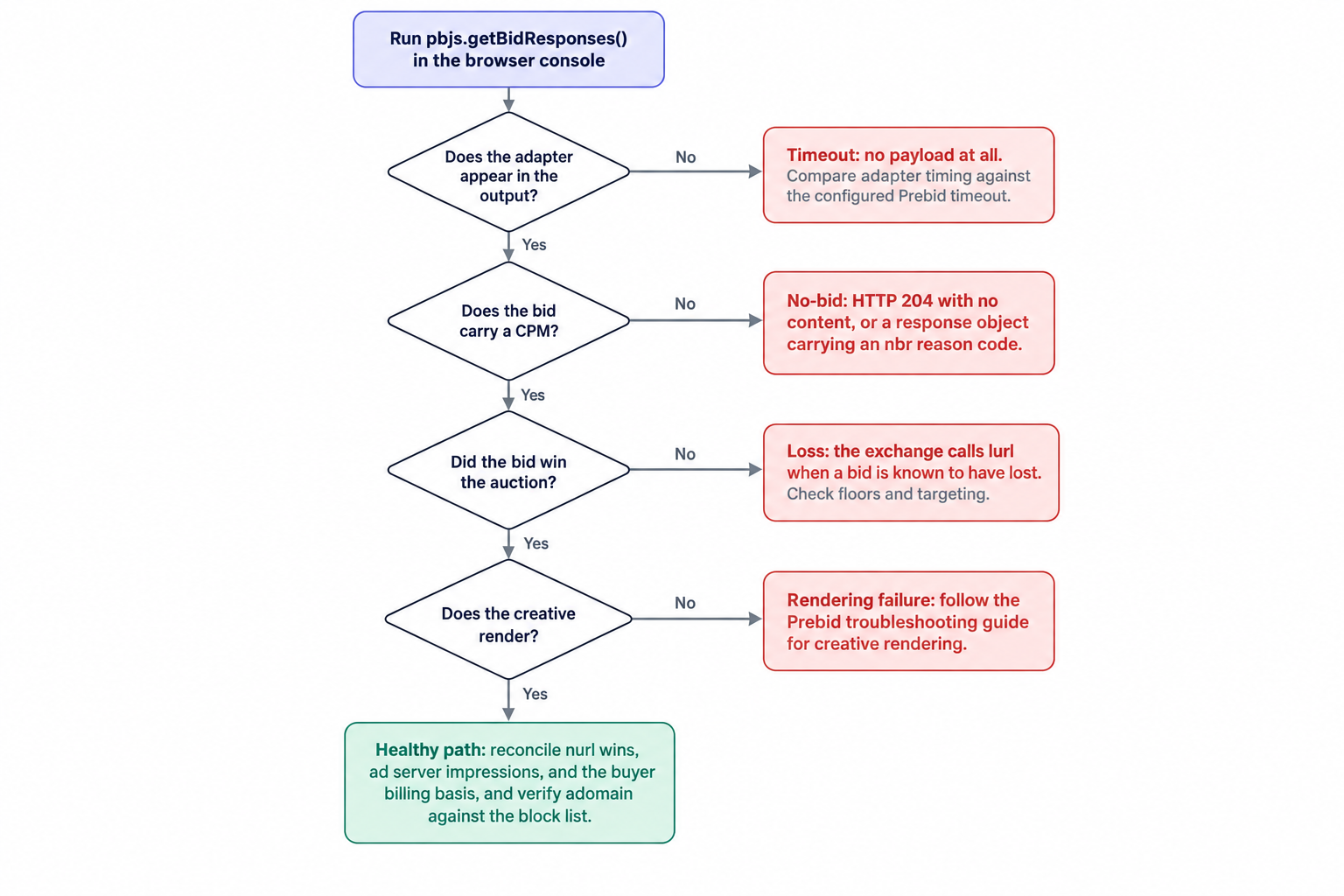
A timeout is neither shape. A timeout produces no payload at all: the bidder answered too slowly for your auction window, which differs fundamentally from declining. Adapters that vanish at peak traffic and reappear off-peak are timing out, not refusing, and the fix sits in the timeout setting, not the floor. Keep three counters per bidder, per format, per geo: 204s, nbr-coded refusals, and timeouts. Each has a different remedy, and mixing them into one "no-bid rate" hides which failure dominates.
Reading responses in the browser with Prebid
Prebid.js exposes bid response inspection in the browser console through the pbjs.getBidResponses() reference, which returns the bids each adapter returned with their status, CPM, and timing. Make it your first diagnostic on any page that underperforms. Open the console on the page, run the call, and read three things per adapter: status, CPM, and timing.
An adapter missing from the output bid nothing and probably timed out. An adapter present with a CPM bid, and lost the auction. An adapter present with no CPM returned a no-bid, a 204 or an object carrying nbr, and your adapter logs say which. Timing deserves equal attention: compare each adapter's timing against your configured Prebid timeout, because an adapter that answers just under the timeout on a quiet page will flake under load and will look healthy in every single-page test you run.
Server-side Prebid changes where you look, not what you look at. The same bid objects arrive over OpenRTB seats, so run the identical three-ledger comparison in your server logs rather than in the console.
When a bidder clearly bids but the creative never renders, you have left the auction layer entirely, and no floor change will fix it. Prebid maintains a troubleshooting guide for bidder responses that covers diagnosing bidder responses, timeouts, and creative rendering. Work it in order before you touch anything else, because a rendering failure mimics demand loss in every revenue report you have.
How the response fields meet the auction in our stack
Our unified auction SSP runs one auction per impression: AdX via MCM, Prebid adapters, and OpenRTB seats compete in a single ranking, with managed floors at placement level. That structure decides what the response fields do to outcomes. Expected-value ranking, not raw CPM, orders the bids, and first-price clearing with bid shading sets what the winner pays, so the CPM you read in the console is the bid, not the clearing price. Reserve prices sit under the whole ranking: a bid that beats every other bid but lands under reserve earns nothing, and only a loss notice tells you it tried. We document auction mechanics and bid shading in depth elsewhere, so here it suffices to say the console CPM and the invoice line item are different numbers by design.
Floors move the notice URLs in predictable directions, which makes floor tests readable. Raise a floor and nurl calls from the affected seat drop while lurl calls rise, so sample both counters before and after any change and you get a clean measurement of what that floor did to that seat's demand. That is also the read we run at invoice time: we pay publishers Net 30, CPM based, with no chasing and no sliding terms, which means the reconciliation has to close in the month it happens, and the notice ledgers are how it closes. Publishers who wire our seats directly will find the OpenRTB and VAST integration contracts in our OpenRTB and VAST API docs.
A weekly field-level audit routine
Run the whole read as a weekly loop, one demand partner at a time. Once the logs exist, each pass costs roughly an analyst hour per partner:
- Reconcile the three ledgers: nurl win counts, ad server impressions, and the partner's billing counts on their stated billing basis.
- Sample adomain from delivered creatives against the block list, not only against request-level blocks.
- Map every dealid in winning bids to your deal sheet, matched by deal id.
- Compare exp against slot refresh intervals and server-side cache lifetimes.
- Split no-bids into 204s, nbr-coded refusals, and timeouts, per bidder and per format.
- Check getBidResponses() timing per adapter against the configured timeout on one sampled page per format.
- Track nurl and lurl volume per seat around every floor change, before and after.
The order matters less than the cadence. Discrepancies grow quietly between audits, and the response fields are the only instrument that measures them from the demand side's own records.
The bid response is the buyer's own account of what happened in your auction. Read it at field level and disputes turn into arithmetic: win counts against impressions, impressions against billing, deals against the deal sheet, losses against floors. We run this audit across our Net 30 demand network and pay CPM based on what it finds, for every publisher above one million monthly pageviews that works with us, on the same terms for all of them.