High-Impact Ad Formats: Balancing User Experience with Maximum Revenue
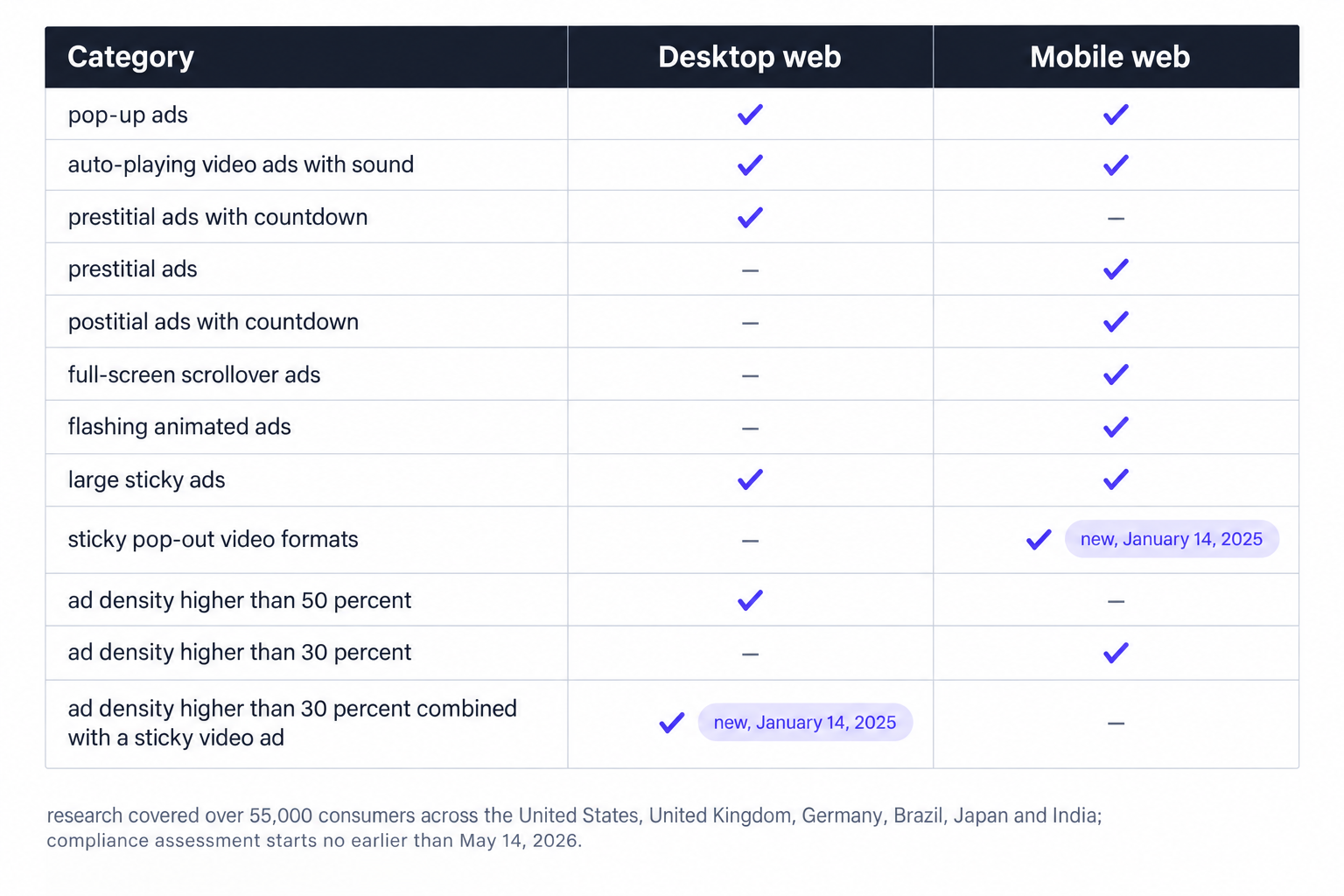
On January 14, 2025 the Coalition for Better Ads added two categories to its standards: ad density higher than 30 percent combined with a sticky video ad, and sticky video formats on their own. The research behind the change covered over 55,000 consumers across the United States, United Kingdom, Germany, Brazil, Japan and India, and compliance assessment starts no earlier than May 14, 2026. That last date belongs on every publisher roadmap now, because sticky video is the unit most high-impact video packages lean on for premium pricing.
High-impact inventory is a trade with a known exchange rate. These formats command a premium by guaranteeing what standard display cannot: a fixed position in the viewport for an entire session, an interruption the reader cannot scroll past, or a surface that covers the page itself. The same properties raise price and risk together, across three fronts: the Better Ads Standards, the Core Web Vitals field data, and the search guidance covering intrusive interstitials. Sites above one million monthly pageviews rarely lose revenue because a format underperformed; they lose it because the format shipped without a density budget, a frequency cap or a reserved container.
The compliance floor: Better Ads Standards
The standards draw a hard line between aggressive and prohibited, and the line differs by device. Treat the lists below as blocking conditions rather than style preferences, because browser ad filtering and buy-side quality controls both key off these categories. We filter the demand we route against them, but no demand filter repairs a template that ships prohibited inventory from its own scripts.
On desktop web, the standards prohibit six categories:
- pop-up ads
- auto-playing video ads with sound
- prestitial ads with countdown
- large sticky ads
- ad density higher than 50 percent
- ad density higher than 30 percent combined with a sticky video ad
Mobile web carries a longer list and a stricter density threshold:
- pop-up ads
- prestitial ads
- ad density higher than 30 percent
- flashing animated ads
- auto-playing video with sound
- postitial ads with countdown
- full-screen scrollover ads
- large sticky ads
- sticky pop-out video formats
Two asymmetries do most of the damage in practice. Desktop tolerates density up to 50 percent, but the tolerance drops to 30 percent the moment a sticky video ad joins the page, which is one of the two categories announced on January 14, 2025. Mobile tolerates no more than 30 percent under any configuration, and it prohibits sticky pop-out video formats outright, the second new category. Plan around the mobile number: a site that holds mobile density at 30 percent or below clears the desktop rule for every layout that does not include sticky video.
Density is a per-breakpoint number
Ad density is a property of a rendered layout, not of a site. Compute it per breakpoint, on the templates that carry the most slots, usually article and gallery pages, by counting the share of the viewport occupied by ads after render. Two mistakes dominate audits: measuring one viewport per template, and leaving sticky units out of the count even though they occupy pixels the reader cannot reclaim. A layout that clears 50 percent on a wide desktop monitor can fail 30 percent on a phone with the same slot count, and a sticky video ad that joins mid-session changes the desktop ceiling after the page has loaded. Re-run the number whenever a template, a slot or a video wrapper changes.
Slot architecture under the IAB New Ad Portfolio
The IAB New Ad Portfolio replaced all previous creative display guidelines, including the Universal Ad Package and the rich media units, and it changed how slots should be specified. New ad units follow aspect ratio and size range rather than fixed pixel sizes, and IAB Tech Lab phased out the 2011 Rising Stars units on a six month sunset. The portfolio also sets the LEAN principles as the baseline for anything you sell: lightweight, encrypted, AdChoices supported, non-invasive advertising.
For slot code, the translation is ranges instead of singletons. A container that declares an aspect ratio and a size range accepts creative across breakpoints without a new ad unit code, and a multi-size request lets a 728x90 and a 970x90 compete for the same desktop impression. High-impact formats gain the most from this model, because anchors and side rails are one logical placement rendered at several geometries per device.
The format playbook
Every format below earns its premium only when three layers line up: the creative guidelines from the IAB portfolio, the device geometry in the slot code, and the prohibited categories in the standards. Before you promise a buyer a package, check it against our ad format catalog, which lists every IAB display size plus in-stream, out-stream, interstitial and CTV video formats. The catalog is the inventory of record; the playbook below is how each entry behaves on a live page.
Anchors
Ad Manager reserves anchors at fixed sizes per device class: 320x50 and 320x100 on mobile web, 728x90 on tablet, and 728x90, 980x90, 990x90 and 970x90 on desktop. Request the largest size the viewport holds and let smaller creative center inside the reserved strip. Verify the closed state as carefully as the open state, because an anchor that changes height when it opens, or when a session ends, shows up as layout shift in field data for every visit that saw it. Refresh policy belongs in the same review: a session-long anchor with a refresh interval still occupies the same pixels, but each refresh resets the attention the buyer priced, so state the cadence in the deal terms.
Side rails
Side rails appear on the sides of desktop pages at 180x500, 160x600 and 120x600, with hard geometry requirements attached: a minimum of 120x500 pixels of empty space beside the main content and a viewport of at least 1200x650 pixels. Audit templates before selling the placement, because a page that qualifies only on wide monitors serves inconsistent inventory, and a page with no empty margin serves none at all. Where the geometry works, a side rail plus a desktop anchor holds the top and the sides of the viewport for a full session without touching the article text, which is the entire product.
Skins and bundled takeovers
Skins earn their rate as packaging: a background takeover sold together with a desktop anchor and a leaderboard to deliver a single brand moment. The standards do not list skins as a category, but the density rules govern the bundle, so count the companion units toward the same density budget as every other placement. Keep the takeover in CSS layers behind the content, never in the document flow, because a skin that participates in layout can push the entire page and poison the CLS reading for the session.
Interstitials and the search penalty
Google Search Central states that intrusive dialogs and interstitials make it hard for search engines to understand the content behind them, which may lead to poor search performance. Legally required interstitials such as age gates are exempt, so keep those and strip the marketing variants from organic landing pages. If interstitials stay anywhere in the stack, run them on internal navigation, cap them at one impression per session, and remove every countdown, because prestitial ads with countdown and postitial ads with countdown sit on the prohibited lists and mobile web prohibits prestitial ads outright. The search risk and the demand risk compound each other: the full-viewport interruption is also the closest cousin of the scrollover and pop-up categories.
Sticky and out-stream video
Sticky video is where the 2025 update bites hardest. The new categories target sticky video on its own and density above 30 percent wherever a sticky video ad renders, and mobile web already prohibited sticky pop-out video formats. Auto-playing video with sound remains prohibited on both desktop and mobile, so every video unit ships muted, with a visible and working sound toggle. Until assessment begins, in-article out-stream is the safer revenue path: the player renders inside the content column, scrolls with the reader, and never pins itself over text.
Layout stability is part of the product
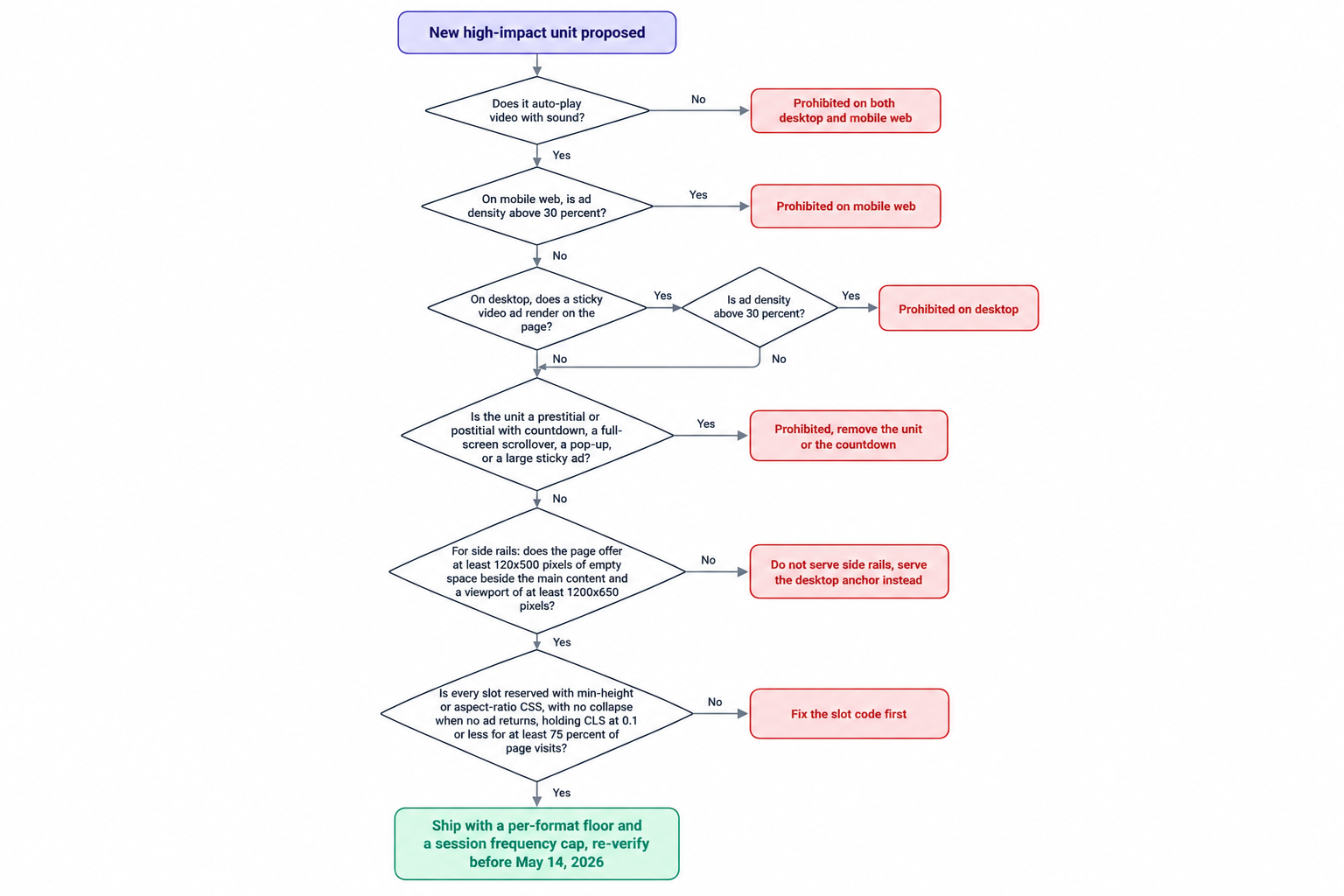
Ads are one of the largest contributors to layout shifts on the web, and high-impact formats carry the most structural risk: a side rail that appears when the viewport widens, an anchor that opens after load, and an interstitial that swaps page state all shift layout after first paint. Google's web.dev guidance sets the target at a CLS of 0.1 or less for at least 75 percent of page visits. Two implementation rules do most of the work: reserve slot space with min-height or aspect-ratio CSS, and avoid collapsing reserved space when no ad returns. A filled slot and an unfilled slot should occupy identical geometry, or the field data will discount your premium formats for you.
Judge the format on session economics
Impression CPM is the wrong scoreboard for high-impact inventory. A sticky unit can lift the average CPM of every impression on the page and still lose money if it shortens the session or pushes readers off before the second anchor refresh. Measure at the session level: hold a slice of templates out of the placement, then run the test arm and the holdout arm against four numbers:
- session revenue per visitor
- pages per session
- scroll depth on the test template
- the share of visits holding a CLS of 0.1 or less
Give the comparison a full content cycle before reading it, because daily volatility on a million-pageview site swamps a single-day read. If session revenue holds and the field data holds, scale the format; if one side breaks, turn the frequency cap before you touch the format itself.
Price the formats separately, govern them separately
Blended floors undervalue high-impact inventory because the buyer prices an average. Give anchors, side rails, interstitials and video their own ad unit codes, their own floors and their own session frequency caps, then judge the portfolio on session revenue. A capped interstitial at a high floor routinely beats an uncapped one at a low floor, because the uncapped version spends its premium buying bounce rate. Packaging belongs at the deal layer: sell the anchor and the side rail together as a session-long position with the caps written into the terms, and tell the buyer what those caps are, because buyers bid with more confidence against inventory they can plan around.
Frequency caps need the same precision as floors. Key the cap to the ad unit and the line item together, scope interstitial caps to the session, and scope anchor refresh to a time interval rather than a page event, so the cadence stays predictable across demand sources. A buyer who discovers an undisclosed cap mid-flight reprices the next campaign.
Demand configuration carries the same weight as pricing. A reserved, capped side rail earns nothing if buyers cannot reach it at the moment of auction, and an anchor that sits out of the header auction starts the session on a house default instead of a clearing price. Our advertiser platform gives buyers demand side reach, verified audiences and curated supply paths through OpenRTB 2.6 buying, so the formats you govern appear in the same auctions as the rest of the page rather than behind a direct tag. Issue distinct deal IDs per high-impact format so buyers can bid the sticky package separately from open auction inventory.
The stack behind the format
Format strategy fails at the operations layer more often than at the design layer. We are an ad network, an SSP and an agency in one company, and we work with thousands of publishers, each above one million monthly pageviews, through our curated programmatic demand network. We pay Net 30, CPM based, with no chasing and no sliding terms. At OnlyMedia we integrate OpenRTB 2.6 seats and Prebid for header and server-side demand, so a capped, reserved side rail competes against the full demand stack instead of a single negotiated buyer. The publisher side of our business pairs monetization and curated demand with a ten minute reporting console and Net 30 payments, which means a floor change or a frequency cap move shows up in reporting the same day you make it.
The audit before May 14, 2026
Compliance assessment for the new categories starts no earlier than May 14, 2026, and a census across a large site takes weeks once template fixes and QA enter the timeline. Agencies running the audit for a client should deliver it as a per-template report, because density and geometry live in templates, not in the ad server. Run the steps in order, and finish each one before starting the next:
- Census every high-impact placement: anchors, side rails, interstitials, sticky video, skins. Record the ad unit code, the device class and the template for each, and check the video wrapper, because sticky behavior often arrives inside a partner script rather than your own template.
- Compute ad density per breakpoint, not per template. Mobile web must hold at 30 percent or below; desktop holds at 50 percent, and the ceiling drops to 30 percent wherever a sticky video ad renders on the page.
- Check side rail geometry against the requirements: at least 120x500 pixels of empty space beside the main content and a viewport of at least 1200x650 pixels. A template that fails the geometry should stop serving the placement rather than serve it inconsistently.
- Verify reservation in the DOM: min-height or aspect-ratio on every ad container, and no collapse when a slot returns empty. Confirm the page holds a CLS of 0.1 or less for at least 75 percent of visits.
- Walk the top organic landing pages. Remove marketing interstitials from those pages, keep the legally required ones such as age gates, and confirm each survivor is genuinely required rather than styled to look required.
- Re-split revenue per format after every fix. The target is a portfolio that holds its CPMs at a density the standards allow, not one that holds density by hiding its best inventory.
Step six is the point of the exercise. An enforcement date creates the rare condition where cleanup and revenue protection point in the same direction: inventory that clears assessment keeps bidding, while inventory that fails drops out of the auction across every demand source at once. Publishers who finish early keep the premium and the search visibility; publishers who wait discover that their highest-earning formats were also the most fragile ones.