How to Fix Sudden AdX Coverage Drops: A 24-Hour Recovery Plan
Coverage in Ad Manager is the Ad Exchange match rate: the fraction of Ad Exchange queries that returned a matched query. The Ad Manager UI labels the metric Ad Exchange match rate, the API calls it Coverage, and both count the same event, a query that found a buyer. When that number slides ten points in an afternoon, revenue follows within minutes, because unmatched queries pay nothing.
A coverage drop has one property that makes it tractable: it has a location. It sits in a country, on a device class, inside one ad unit or one size, or it sits everywhere at once, and that location cuts the candidate causes from a dozen to two or three before you touch a single setting. The first 24 hours decide whether you fix the real cause or spend the following week unwinding changes that never mattered. Work the day in phases: rule out platform causes, segment, pull diagnostics, fix in order, verify.
What coverage counts, and what it does not
Coverage divides matched queries by the queries your tags sent to AdX. It does not divide by pageviews, and it does not see header bidding requests that never reached AdX. Both distinctions matter during a recovery.
First, a coverage drop is not automatically a revenue quality problem. A floor raise filters low bids on purpose, so coverage falls while CPM on the surviving matches climbs, and the estate-wide number cannot tell a loss from a deliberate trade. Second, coverage blends every segment. A slide on the blended line can hide a healthy core audience plus a new traffic source that no buyer wants, which is why the segments, not the summary, identify the cause.
Google gives you one more lens for the empty side of the ledger: unfilled impressions, an ad request that returned no ad because none were eligible to serve. Google's diagnostic for that metric combines the Ad unit and Requested ad sizes dimensions with the Unfilled impressions metric, so use it to find which slot shapes stopped clearing, not just how many requests went empty.
Hour zero to hour one: rule out the platform, then size the drop
Two checks start the clock. First, open the Google publisher status dashboard, which tracks live incidents for Ad Manager, AdSense, AdMob and related platforms. If an incident matches your drop window, your job changes from diagnosis to communication: log the incident, notify stakeholders, change nothing. Floors moved during a platform incident contaminate every comparison you make afterwards, and coverage should recover on its own once Google closes the incident.
Second, size the drop against a like-for-like window. Compare this Tuesday 14:00 to 17:00 against last Tuesday 14:00 to 17:00, never against the previous three hours, because day-parting moves coverage hour by hour on its own. Our ten-minute reporting console refreshes CPM, fill rate, ad requests, pageviews, revenue, country and device splits and video detail every ten minutes, with API access for scripted checks. Refresh speed decides how much of the drop you can still see: a team on daily exports finds the slide hours or days late, when the onset time, the sharpest signal in the whole investigation, has already blurred.
Script the baseline pull instead of eyeballing charts under pressure, because a misread onset time corrupts every segmentation cut that follows. Before the hour ends, write down three answers: when coverage deviated from baseline, how deep the drop runs against that baseline, and whether the status dashboard came back clean.
Hours one to four: segment before you change anything
Separate two failure shapes before you cut anything. If ad requests fell and coverage held, your tagging or your traffic broke, not your demand: a broken tag sends fewer queries, and the queries that remain can match at a healthy rate while revenue collapses. If requests held and matches fell, demand or filtering changed. A Prebid change that wins more impressions upstream changes which impressions reach AdX at all, so log header and server-side changes alongside floor changes when you reconstruct the timeline. One report settles the question: ad requests and matched queries side by side across the drop window.
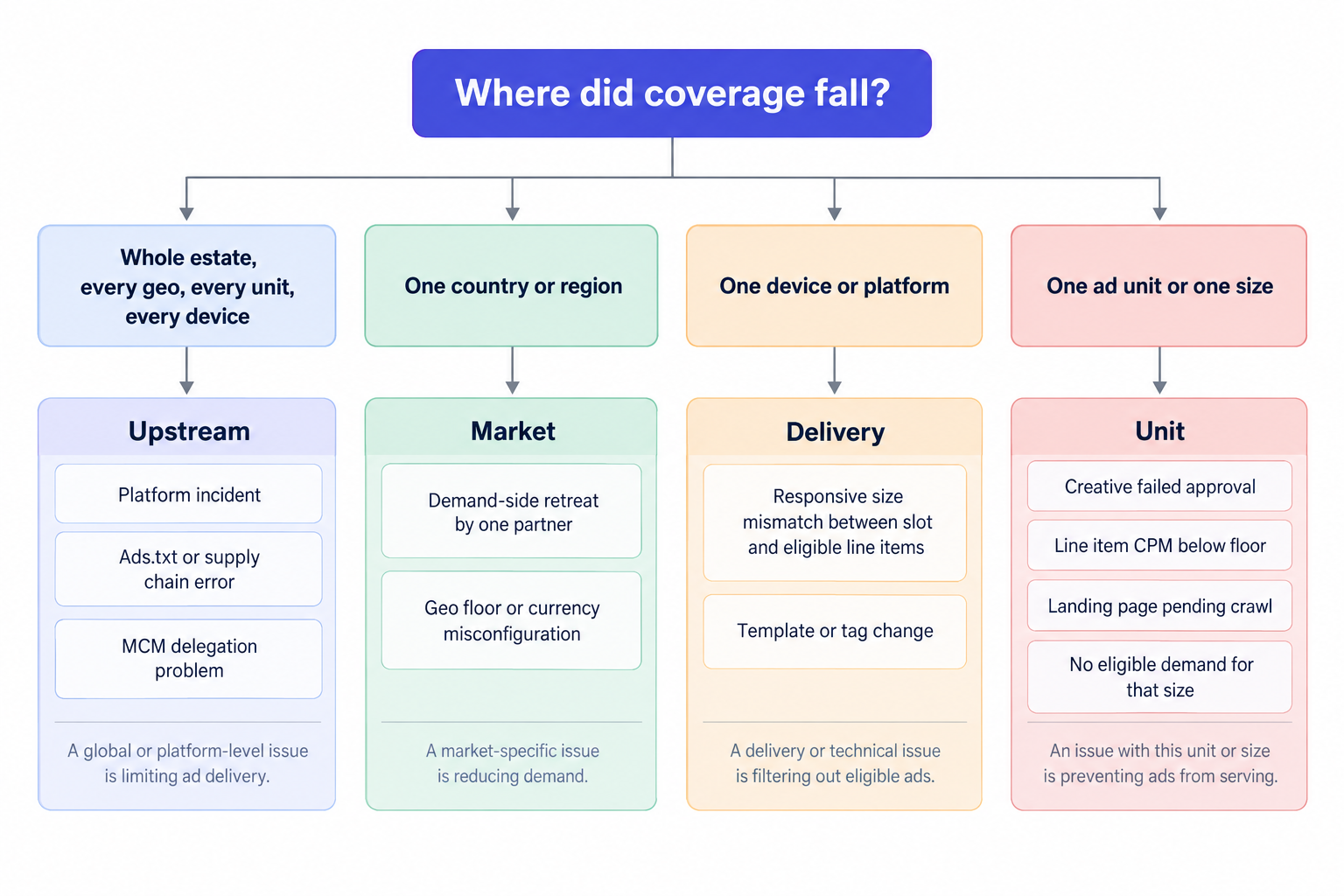
Then run four cuts against the drop window: country, device, ad unit, requested size. Add a fifth cut on traffic source if your analytics supports it. The pattern points at a layer before any setting does, so resist the urge to roll back floors in this phase: a rollback aimed at the wrong cause moves nothing and destroys the evidence for the right one.
Four patterns cover most cases:
- Everything dropped at once, every geo, every unit, every device. The cause sits upstream of the auction: an ads.txt or supply chain problem, an MCM delegation problem, or a platform incident. Unauthorized seller (Ads.txt) and Unauthorized seller in supply chain errors stop line items from spending entirely, and correct ads.txt and app-ads.txt implementation prevents the revenue loss those errors cause; Google documents creating ads.txt in Ad Manager alongside the troubleshooting steps for the errors themselves. Typical breakages: a CMS update renamed the file path, a CDN serves a stale copy, the MCM record went missing during a migration, a typo entered during an edit.
- One country or region dropped, the rest held. Buyers retreat from geos without announcements, and Open Bidding does not require exchange partners to bid on every request, so one seat ending a flight in one market dents coverage without producing a single error on your side. Check geo-specific floors and currency settings as well, because a floor tuned for one market rarely fits another.
- One device or platform dropped. Something changed in delivery to that class: a new page template, a responsive tag change, a size mismatch between the slot definition and the sizes eligible line items accept. Mismatched sizes create ad requests nothing can fill.
- One ad unit or one size dropped. The cause sits in that unit's eligibility or filtering: creative approval, a floor the unit cannot clear, or a size with no eligible demand. This pattern gives the fastest diagnosis, because the scope already excludes the network.
When everything drops at once, check the MCM chain alongside the ads.txt file. In a parent-child setup, the child's inventory resolves through the parent's delegation, so verify the MCM relationship status in Ad Manager: a delegation that broke during a migration looks identical to an ads.txt failure from the revenue side, and the fix lives in a different screen.
Segmentation also tells you what did not break. If coverage held on three of four geos, your ads.txt file, your MCM chain and your platform all work, and the remaining work concentrates on one market's demand.
Hours four to twelve: pull the diagnostics while they exist
Google documents its bid filtering causes, and the line item Troubleshoot tab surfaces them per line item. Three causes cover most real drops: a creative fails approval, so the bid filters; a line item CPM falls below the floor set in pricing rules, so the bid filters; a landing page URL still waits for Google's crawl and review before an ad can show. Each cause takes a different fix, so separate them before you touch anything.
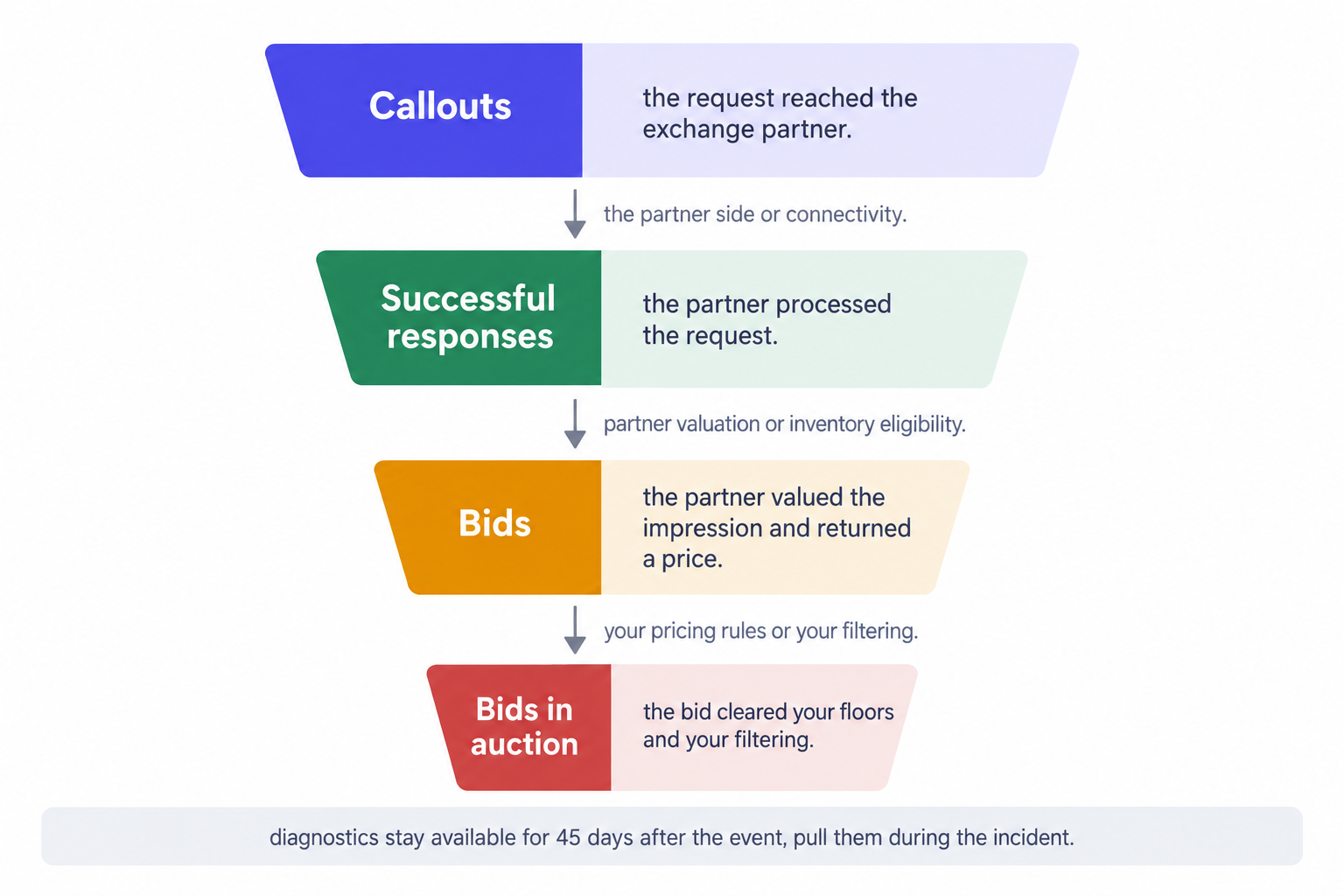
Open Bidding adds a second lens. Yield group diagnostics expose four funnel stages per exchange partner: callouts, successful responses, bids, and bids in auction. Callouts show whether the request reached the partner, successful responses show whether the partner processed it, bids show whether it valued the impression, and bids in auction show which bids cleared your floors and your filtering. Read the collapse point: a gap between callouts and successful responses points at the partner or connectivity; a gap between successful responses and bids points at partner valuation or inventory eligibility; a gap between bids and bids in auction points at your own pricing rules or your filtering layers. The diagnostics stay available for 45 days after the event and then disappear, so pull the funnel for the drop window during the incident, not at the next scheduled review. A team that waits a month loses the only dataset that separates partner behavior from your own configuration.
Our curation layer sits in front of the auction: managed floors, demand mapping, whitelists, pre-bid brand safety filtering and MFA filtering aligned with the IAB Content Taxonomy. Every one of those layers can dent coverage when it changes, so the first internal question in any drop asks what changed in the layer and when. A managed floor raise behaves exactly like a pricing rule floor: fewer matches, higher clearing prices on the survivors. A brand safety or MFA filter keyed to a Content Taxonomy label removes demand from any section it reclassifies, and that drop lands on the reclassified section alone, which makes it one of the few causes a content dimension finds without any other cut.
Seven causes, in the order that pays
Order the candidates by how fast each fix restores matches, because some fixes carry latency you cannot compress.
- Platform incident. Signal: every segment drops in the same minute and the status dashboard confirms it. Fix: hold all changes, document the window, wait; the recovery itself is the verification.
- Ads.txt or supply chain error. Signal: line items stop spending, and the error column reads Unauthorized seller (Ads.txt) or Unauthorized seller in supply chain. Fix: restore the file at the root, confirm it fetches from outside your own network, and allow propagation time before you judge the result.
- Floor or pricing change. Signal: bids land below the floor, and the drop's onset matches a timestamp in your change log. Fix: roll the floor back if nobody intended the trade, or record it as deliberate, because coverage down with CPM up can be the plan rather than the failure.
- Creative approval and landing page review. Signal: the Troubleshoot tab shows bid filtering for creatives without approval or landing pages pending crawl. Fix: swap in approved creatives, re-request review, and verify the result in the tab instead of assuming it.
- Demand-side pullback. Signal: one Open Bidding partner or one geo underperforms while the rest hold, and partners choose which requests to bid on, so a quiet retreat produces no error anywhere. Fix: rebalance demand mapping toward healthy seats and onboard replacement demand.
- Size and eligibility mismatch. Signal: unfilled impressions concentrate on one ad unit or requested size. Fix: align the slot's size definitions with the formats and line items eligible for it.
- Traffic mix and filtering. Signal: the blended line falls while core segments hold, or the drop maps exactly to a content section. Fix: segment by traffic source before you react, and audit Content Taxonomy labeling on every section the drop touches.
Two notes on the order. Latency differs by cause: a floor rollback lands in the next auction, while creative review and ads.txt propagation take hours, so start the slow fixes early and run the fast ones in parallel. Causes also travel in pairs: a floor change that dents one geo can expose a partner pullback hiding behind it, so re-run the segmentation after each fix instead of stopping at the first improvement.
Hours twelve to twenty-four: fix, verify, install guardrails
Apply fixes in the order above, one at a time, and log each change with a timestamp. Two changes at once produce a compound result nobody can attribute later. Give each fix its own observation period against a like-for-like window, because ads.txt propagation, creative review and MCM status changes each carry their own latency.
Verification has one rule: compare like with like, same hours, same weekdays, same segments. A Tuesday afternoon proves nothing against a Saturday morning, and a recovery measured only on the blended line will miss a segment that never came back. Track revenue per thousand matched queries alongside coverage during recovery, because that pair shows whether the fix restored matches without degrading what the matches pay. Close the incident when coverage returns to baseline on every segment that dropped, then write the postmortem while the Open Bidding diagnostics still sit inside their 45-day window, because a postmortem written a month later rests on memory instead of data.
Then install the guardrails that shorten the next incident:
- A coverage delta alert that fires when coverage deviates from a seven-day same-hour baseline beyond a threshold you set.
- An ads.txt reachability check that fetches the file from more than one region on a schedule, because a CDN serving a stale copy to some edges looks exactly like a coverage drop.
- A change log for every floor, whitelist and demand mapping edit, with the operator's name on it.
- A weekly pull of Open Bidding yield group diagnostics, so the 45-day expiry never eats the evidence.
- Partner-level coverage tracking by seat, so a partner pullback appears as a named line in a report instead of a dent in the blended chart.
Guardrails remove the discovery cost from the next incident, and discovery is where the 24 hours actually go.
When 24 hours are not enough
Drops that survive the full plan usually live in two places: demand health and demand mapping. Both sit on the supply side, and both are work we do daily. At OnlyMedia we run Google Ad Manager, AdX and MCM for our publisher partners, with Prebid and OpenRTB 2.6 seats for header and server-side demand, one unified auction per impression and managed floors in front of it, all through our SSP and managed floors layer.
We work with thousands of publishers, each above one million monthly pageviews, inside our curated programmatic demand network, and we pay Net 30, CPM based, no chasing, no sliding terms. If the drop outlives the plan, bring the incident log, the segmentation cuts and the funnel stages to publisher and partner support: a team that receives the data attached starts at hour zero instead of hour four.