How to Monitor and Prevent Ad-Induced Page Layout Shifts (CLS)
A 970x90 leaderboard that re-renders as a 970x250 after the auction clears pushes every paragraph below it down the page. Google scores that push, and it flags the page poor once the score passes 0.25 at the 75th percentile of page loads. On a property above one million monthly pageviews, the Core Web Vitals report reads mostly as a report on ad operations, because ads drive a large share of the web's layout shifts. Here is how we read that report, trace a bad score to specific slots, and configure demand so ads stop moving the page.
How the score is built
CLS measures the largest burst of unexpected layout shifts during the entire lifecycle of a page, from first paint to tab close. Each individual shift scores as impact fraction times distance fraction: the share of the viewport the shift touches, multiplied by how far the moved content travels relative to the viewport. Work an example: a shift that touches the top half of the viewport carries an impact fraction of 0.5, and content that travels a quarter of the viewport height carries a distance fraction of 0.25. That single shift scores 0.125.
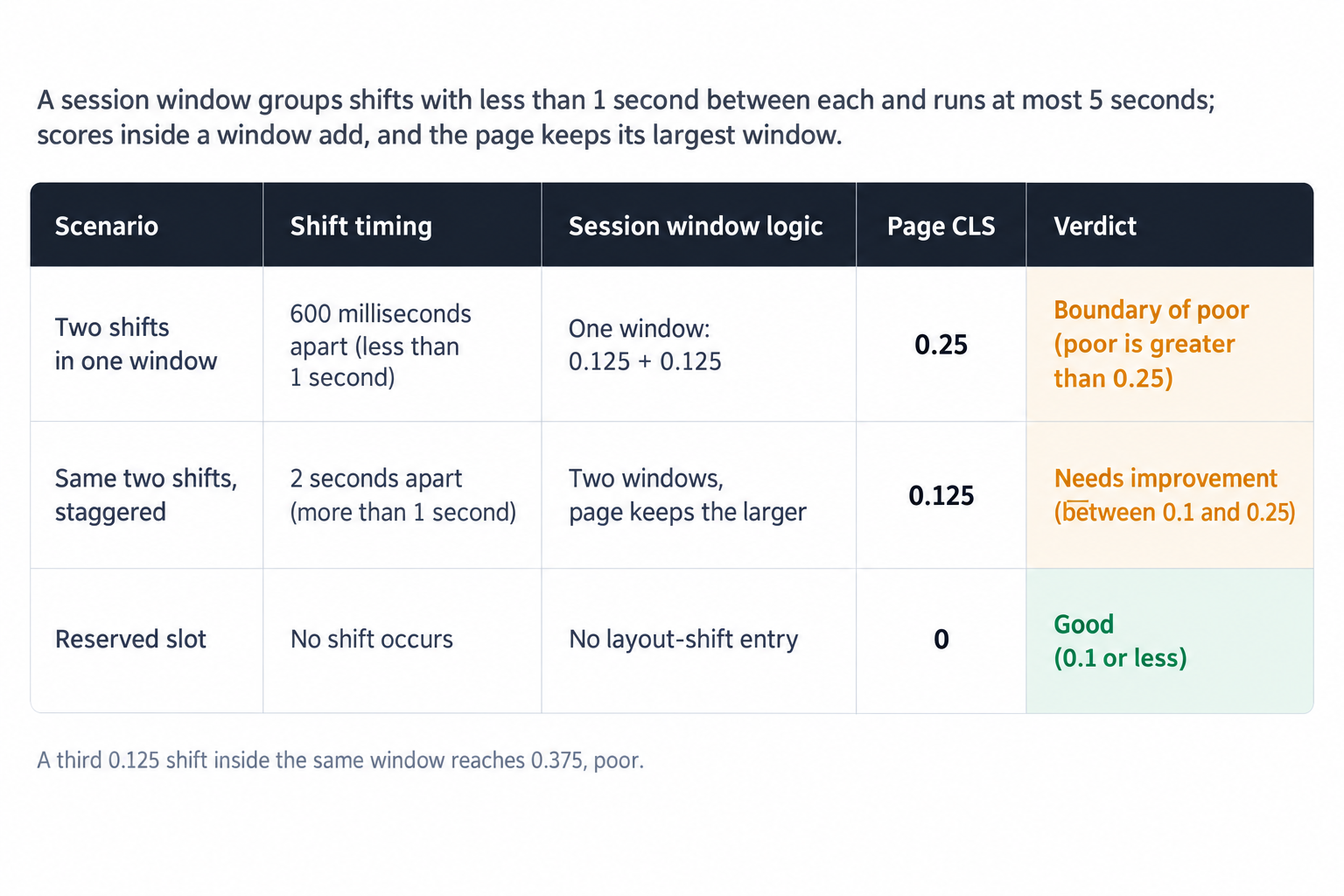
Shifts accumulate into bursts. A session window is one or more shifts in rapid succession, with less than 1 second between each shift and a maximum window length of 5 seconds. Scores inside one window add together, and the largest window sets the page's CLS. Two shifts of 0.125 each, separated by 600 milliseconds, land in one window and produce a page score of 0.25, the boundary of the poor threshold; a third such shift in the same window pushes the page to 0.375. The same two shifts separated by 2 seconds open two windows, and the page records only the larger of them, 0.125.
Google grades the result at the 75th percentile of page loads, segmented across mobile and desktop. Good means 0.1 or less, poor means greater than 0.25, and scores between the two need improvement. The percentile choice carries operational meaning: a quarter of your loads can score worse than the reported number and the property still passes. The device segmentation matters just as much, because distance fraction measures movement against viewport size, so the same push scores worse on a small mobile viewport than on a large desktop one. The CLS reference on web.dev documents the scoring rules, session window mechanics and thresholds in full.
Why ads carry the score
Ads are one of the largest contributors to layout shifts on the web, and dynamically injected content closer to the top of the viewport causes greater shifts, per Google's CLS optimization guide. The cause is structural rather than careless. An ad slot is a box that fills late by design: the page paints, the auction runs, the creative arrives, and only then does the slot reach final height. Any configuration that leaves that height undefined until render time is a bet that the reader has not scrolled to the slot yet.
Viewport position decides severity. A top leaderboard that expands moves everything below it, so the impact fraction covers most of the viewport and the distance fraction scales with the whole content column; one slot can carry the entire page score. A footer slot expands below the reading position and barely registers. The formats differ too: multi-size display slots, out-stream players that initialize at unknown heights, adhesion units that attach to the viewport edge, and refreshed slots that change size between auctions cause most of the ad shift teams chase.
One exclusion works in your favor: shifts that immediately follow user input do not score. Click-triggered expandables are not the enemy. Unrequested renders are, and every fix in this article targets them.
Monitoring: field data, local reproduction, then attribution
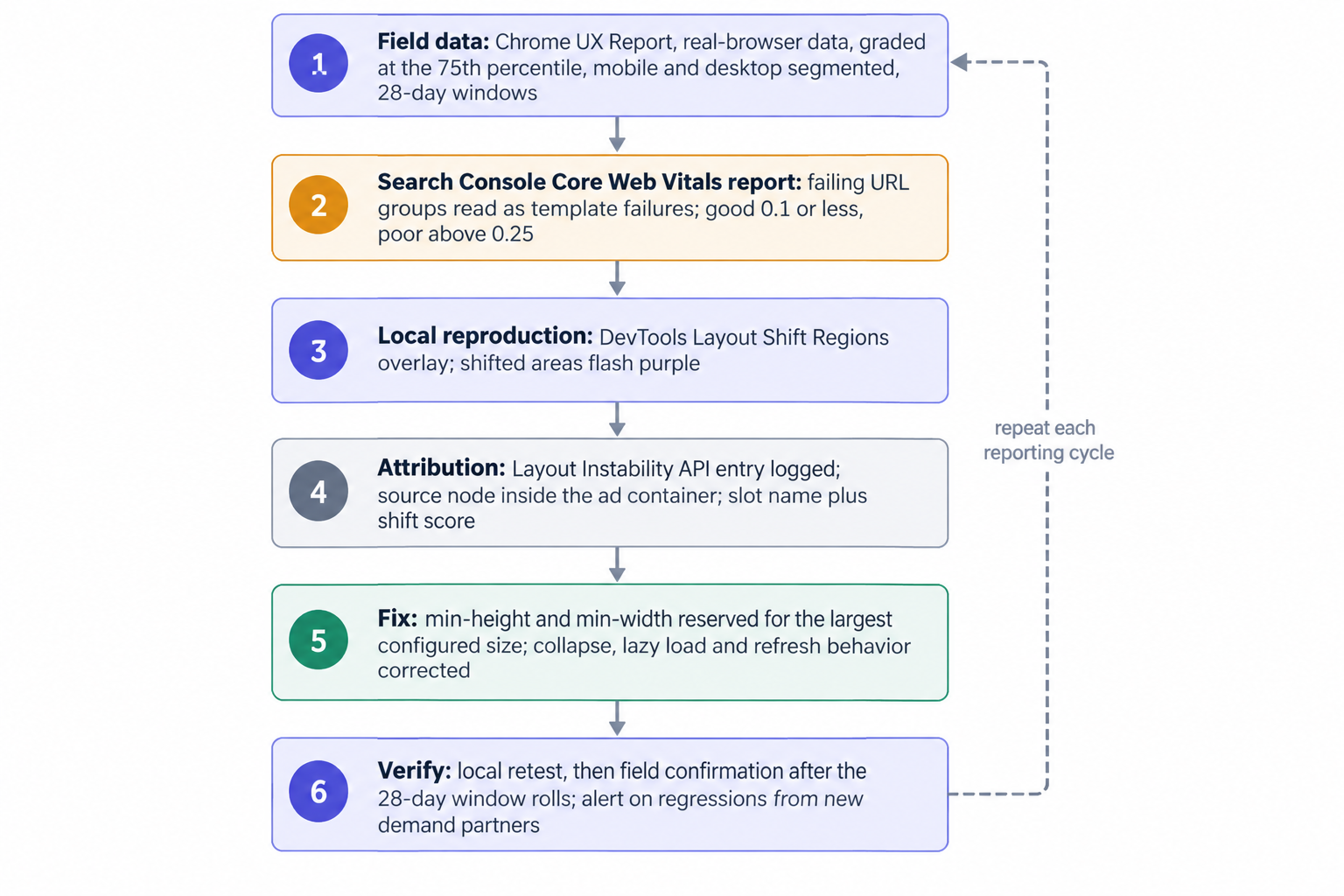
Start with field data, because Google grades on field data. The Chrome UX Report is the dataset of the Web Vitals program, built from real-browser field data, and Search Console's Core Web Vitals report reads from it in 28-day windows. Two consequences follow. The report lags: ship a fix today and the field report reflects it fully only after the 28-day window rolls, so verify locally instead of waiting on Search Console. The report also splits mobile from desktop, so run two workstreams: mobile failures usually trace to a top leaderboard or an adhesion unit, desktop failures to multi-size sidebars and out-stream placements.
Then reproduce. DevTools exposes a Layout Shift Regions overlay that briefly highlights shifted areas in purple, which turns an abstract number into a visible map of the page. Load the failing template, scroll the way a reader scrolls, and note which regions flash.
Then attribute. The Layout Instability API reports a layout-shift entry whenever a visible element changes its start position between two frames, and each entry carries the shift score plus the source node with its previous and current positions. Wire a listener into your RUM pipeline: capture each entry, test whether the source node sits inside an ad container, and log the slot name with the score. A week of traffic gives you the artifact that drives the work, a table of placements ranked by the layout shift score they generate.
Join that table to revenue. A slot that produces most of your CLS and a sliver of your revenue is an easy cut; a slot that splits the two needs a reservation, not a removal. Our ten minute reporting console puts per-placement revenue and fill next to each other, so the comparison takes minutes, not a data request. Run the join before touching a single div.
Reserve the space: the only guaranteed fix
The only guaranteed way to avoid ad layout shift is reserving sufficient space with CSS, and reserving space for the largest configured size is the most effective elimination. Google's GPT guide to reserving slot space gives the method: min-height and min-width properties on the slot container, sized to the largest creative the slot can serve. Everything else in this article reduces or redirects shifts. This removes them, and a correctly reserved slot cannot move regardless of what the auction returns.
Apply the rules as follows:
- Set min-height to the tallest creative in the slot's configured size set. A slot that accepts both 300x250 and 300x600 reserves 600 pixels of height, on every load, filled or empty.
- Set min-width the same way where a narrow creative in a wide container would leave the layout reflowing around it.
- Put the reservation on the wrapper div and hold it through the auction. A container that finds its height only when the creative fills has already shifted.
- Treat the reservation as inventory. If 300x600 bid density is thin on a placement, drop 300x600 from the size set rather than reserving 600 pixels for creatives that rarely arrive.
Those four rules cover standard display placements. Two behaviors undermine them more than anything else. Collapse: a slot that collapses on no-fill moves everything below it, and the collapse usually lands in the same session window as neighboring renders, so the scores add. Either hold the reservation and backfill with a house creative, or collapse only below the reading position, where the movement produces no entry at all. Lazy load: lazy loading cuts latency and protects viewability, but a slot that renders into a zero-height container once the reader approaches it creates exactly the shift you were avoiding. Reserve first, then lazy load.
Handle the special formats explicitly:
- Adhesion units: pin them with fixed positioning and reserve the viewport space they occupy, or the content behind them moves when they attach.
- Out-stream video: wrap the player in a container with a fixed aspect ratio and reserve it before the player initializes, because player libraries pick their own height when you let them.
- Interstitials: full-viewport formats cover content instead of pushing it, but dismissal must restore the underlying layout without moving it.
- Ad refresh: refresh in place. The refreshed slot renders into the same reserved dimensions it started with; a refresh that changes size is a new shift, and shifts inside 1 second of each other share a window.
Reservation also absorbs creative-side problems. Late-loading assets inside a correctly sized iframe shift nothing outside it, and consent management delays that push auction start later shift nothing either, because the placeholder already holds final height.
Slot configuration, priced before you ship it
Most ad-induced CLS gets decided before a single bid returns, in the size set and the placement list. Audit the sets first: display and video ad formats covers every IAB display size plus in-stream, out-stream, interstitial and CTV video, and every format that can render into a page needs a reservation rule attached before it enters a placement. Then price what you cut. Dropping 300x600 from a set frees 350 pixels of scroll depth and costs whatever the 600-tall creatives were paying: auction mechanics and reserve prices govern how first-price bids with bid shading land against your floors, and per-size reporting shows what the format carried last week. Configure size sets where the reservation and the revenue agree.
Auction timing and window staggering
Every ad shift happens in the gap between first paint and creative render, which makes auction latency a CLS variable. We integrate OpenRTB 2.6 seats and Prebid for header and server-side demand, and the wrapper timeout you set determines how long reserved placeholders hold. Reservation makes the timeout invisible: with a correctly sized container, a slow auction costs viewability, not stability. Without a reservation, every millisecond of timeout is another millisecond in which the layout stays provisional.
Where reservation is impossible, staggering helps, and the session window rules explain why. Shifts less than 1 second apart share a window and their scores add; shifts more than 1 second apart open separate windows, and the page keeps only the largest. Two slots that would each shift 0.125 score 0.25 together, but the same two renders staggered past the 1-second boundary score 0.125. Hold top-of-page slots to a hard timeout, then delay the next slot's render past one second. Staggering is a mitigation, not a fix: it splits the score, but the reader still watches the page jump twice.
How we run this across the network
OnlyMedia operates as an ad network, an SSP and an agency in one company, and we work with thousands of publishers, each above one million monthly pageviews, so we enforce layout discipline on the demand side as well as the sell side. We filter OpenRTB 2.6 seats that return sizes their slots cannot honor. A partner serving a 600-tall creative into a 250-reserved container re-creates the shift the publisher engineered out, so the seat gets filtered before the publisher sees the damage in a field report weeks later. Our curated programmatic demand network runs that way by design: Net 30 payouts, CPM based, publishers above one million monthly pageviews, and seats that respect slot dimensions.
Payment terms matter during a rebuild. We pay publishers Net 30, CPM based, no chasing, no sliding terms, because a CLS rebuild often dents revenue for a week or two while the fixes take hold and the field report takes 28 days to confirm the gain. Predictable payouts let a publisher take the fix without financing the gap.
A runbook for a CLS rebuild
Work the rebuild in this order, and treat it as a template-level problem rather than a sitewide one, because CLS attaches to page loads and heavy templates carry the 75th percentile.
- Pull the Search Console Core Web Vitals report and split mobile from desktop; read failing URL groups as template failures.
- Reproduce each failing template locally with the DevTools Layout Shift Regions overlay and note which regions flash purple.
- Log Layout Instability API entries in RUM, attribute them to slot containers, and rank placements by shift contribution over a week of traffic.
- Join the ranking to per-placement revenue and fill in reporting.
- Reserve min-height and min-width for the largest configured size on every slot in the worst template, starting at the top of the page.
- Trim size sets you cannot afford to reserve, fix collapse and lazy load behavior, pin adhesion units, and cap refresh to in-place renders.
- Re-test locally, ship, and check the field report after the 28-day window rolls; check again one window later to catch regressions.
Regression is the quiet failure mode here. A new OpenRTB seat, a new video placement, a creative type that arrives with its own assets, each can reintroduce shifts without touching your code. Keep the attribution listener running permanently and alert when a placement's weekly shift contribution climbs back into the failing band.
The trade you are actually making
Zero ad-induced shift is available to any publisher: reserve the largest configured size on every slot and no creative can move a pixel, whatever the auction returns. The cost is scroll depth and impression density, because reserved-but-unfilled space is still space a reader scrolls through. Publishers who monitor per placement, reserve deliberately, and hold demand partners to slot dimensions settle at 0.1 or below, the good threshold, and keep the revenue line intact while they do it. Publishers who skip reservation and chase the score with staggered timers keep watching the same purple flashes every quarter, with a field report that says poor and no per-placement data to explain why.