Implementing Sticky Ads and Anchors: Code Best Practices and Google Policies
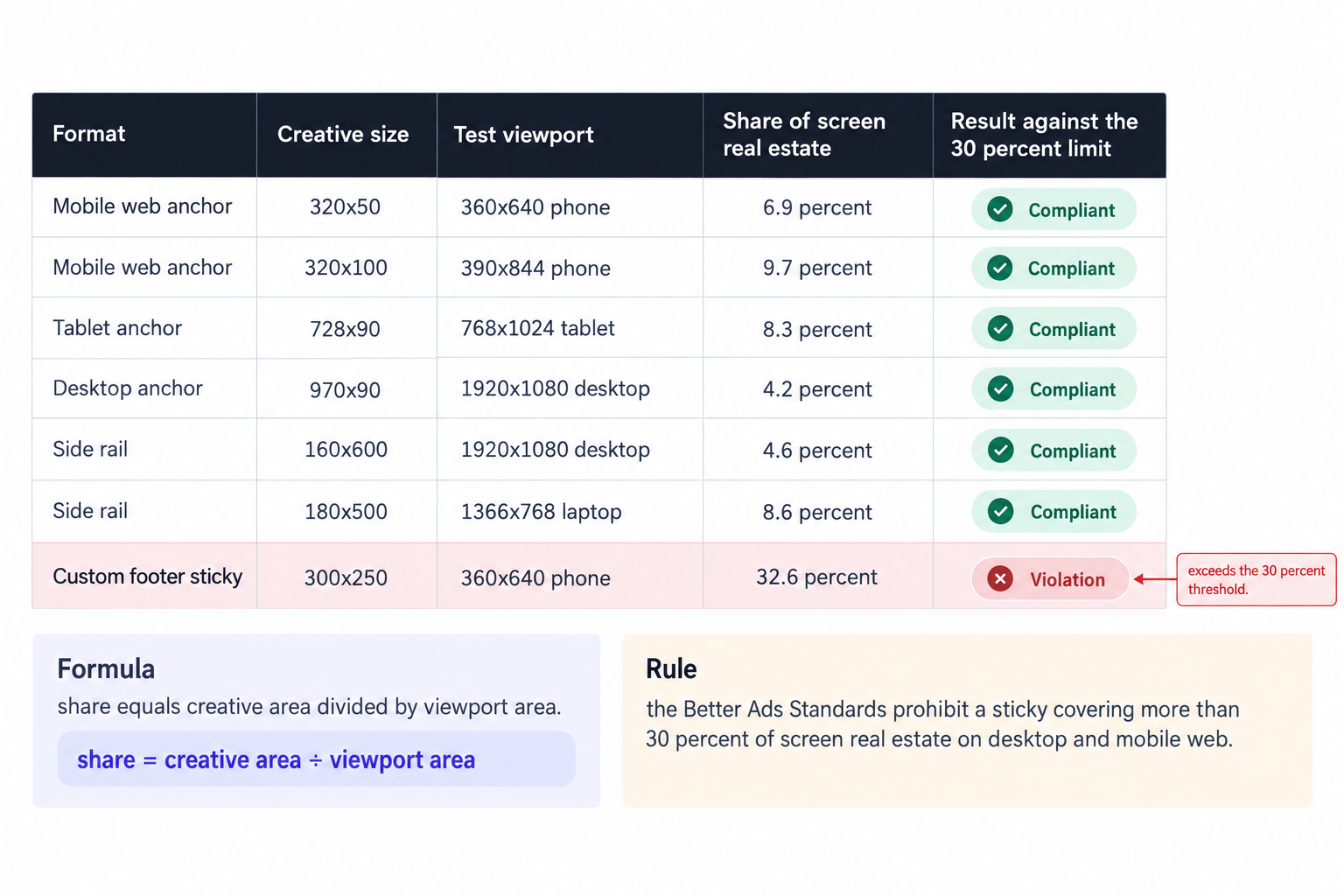
A sticky ad that covers more than 30 percent of the screen's real estate falls outside the Better Ads Standards on both desktop and mobile web, and Chrome filters pages that cross that line. That threshold is the first test for any sticky build, ahead of positioning CSS, demand setup and refresh logic, because no revenue pattern survives a filtered page. The second constraint is structural, and it splits the work into two paths: GPT anchors run through a dedicated out-of-page API, insert their own containers, and return null when the environment cannot serve them, while any sticky wrapper you build yourself answers to separate Ad Manager rules on overlap, scroll behavior and declaration. Most sticky incidents we see in ad operations trace back to three mistakes: trafficking an anchor through defineSlot, letting a fixed wrapper cover page content, or resizing an ad container after render. Each one costs minutes to prevent and a policy review to discover.
Two formats, two rulebooks
Everything publishers call sticky falls into two implementations with different owners. The anchor is an out-of-page format: Google defines it, positions it, sizes it and collapses it, and you only request it. The custom sticky is a standard in-page slot that you reposition with CSS, usually position: fixed or position: sticky, and that you declare inside Ad Manager. The anchor path answers to the Publisher Tag references, the custom path answers to Ad Manager's policy for stickies, and the two rulebooks do not interchange.
Both paths converge on the same outcomes. The unit stays visible without covering content the user needs, the page does not reflow after render, and coverage stays under the 30 percent ceiling the Better Ads Standards set for desktop and mobile web alike. Hit those three targets and every remaining decision becomes an engineering preference rather than compliance exposure.
Defining the anchor slot
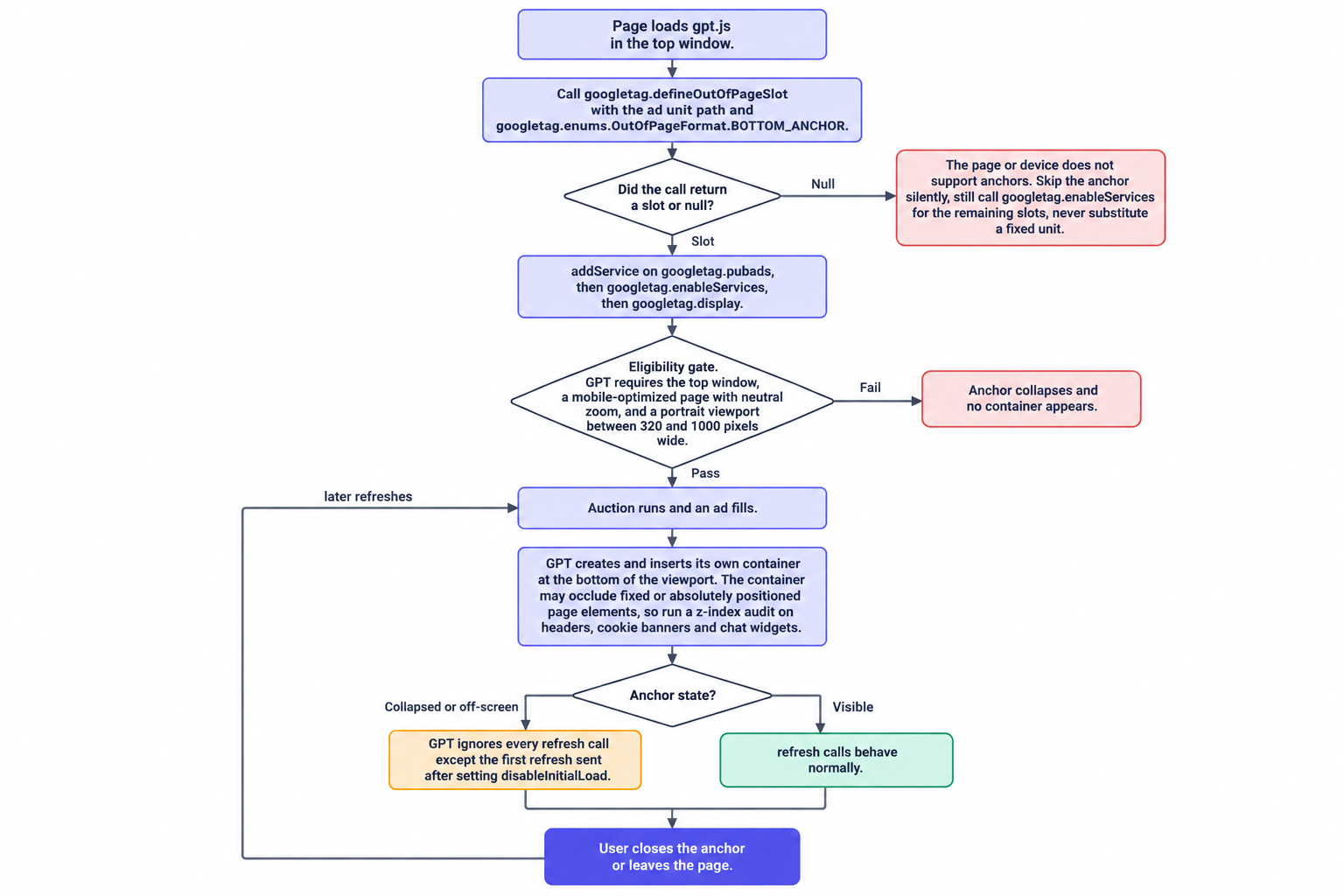
Anchor slots never go through defineSlot. Define them with googletag.defineOutOfPageSlot and the OutOfPageFormat enum, BOTTOM_ANCHOR for the bottom edge, and the same enum carries the other out-of-page variants, including TOP_ANCHOR, interstitials, rewarded and the desktop side rails. The call returns null when the page or device does not support anchors, so the null check belongs in the code as a matter of contract, not defensive habit.
googletag.cmd.push(function () {
  const anchorSlot = googletag.defineOutOfPageSlot(
    '/12345678/site/anchor',
    googletag.enums.OutOfPageFormat.BOTTOM_ANCHOR
  );

  if (anchorSlot) {
    anchorSlot.addService(googletag.pubads());
  }

  // Enable services even when the anchor is unsupported,
  // so every other slot on the page still serves.
  googletag.enableServices();

  if (anchorSlot) {
    googletag.display(anchorSlot);
  }
});
Two details in that snippet carry operational weight. First, enableServices sits outside the null branch: on a real page the anchor is one slot among dozens, and gating service enablement on anchor support breaks every other unit on any device that refuses anchors. Second, no publisher div exists in the markup at all. GPT creates and inserts its own container when an ad fills, so your markup gives you no hook for styling, spacing or overlap control around the anchor. Build any wrapper or measurement container around the page content instead, because the container GPT inserts will not respect your layout rules. The full pattern, together with the eligibility rules and container behavior behind it, comes from Google's anchor ad sample for the Publisher Tag.
Anchor eligibility: the three gates
An anchor serves desktop, tablet and mobile only when three conditions hold at once. GPT must run in the top window, so a tag that loads inside an iframe sees no anchor. The page must serve a mobile-optimized layout with the user at neutral zoom, which in practice means a correct viewport meta tag and no active pinch zoom. The viewport must sit in portrait orientation, with a width between 320 and 1000 pixels.
Those conditions convert directly into QA work. Rotate a phone to a wide viewport and expect an empty anchor. Test with an active pinch zoom, a missing viewport meta tag and an iframe embed, and treat the resulting collapse as correct behavior rather than a bug. When the anchor does not serve, do not patch the gap with a hand-built fixed banner: the eligibility gate exists to keep anchored formats out of environments where they degrade the page, and a replacement unit recreates the exact violation the gate prevents.
Anchors rarely travel alone in a mobile plan. Weigh the format against interstitials, rewarded video and in-app placements, and pair the decision with device-level reporting to see where the impressions actually land. Our overview of mobile web and in-app formats covers the full mobile inventory set, from standard banners to rewarded video.
Containers, occlusion and refresh semantics
The anchor container behaves differently from any in-page slot you have debugged. GPT inserts its own container only when an ad fills, that container attaches at the bottom of the viewport, and it may occlude fixed or absolutely positioned page elements. That last clause deserves a page-wide audit, because sticky headers, cookie consent banners, chat widgets, progress bars and notification toasts all sit in exactly the position class an anchor covers.
Decide precedence before launch. In most layouts the anchor wins the bottom strip and everything else moves: lift cookie banners clear of the anchor zone, move chat widgets away from the bottom edge, and accept that a bottom-fixed navigation bar cannot coexist with a bottom anchor. Verify both render states on device, once with a winning creative and once with an empty response: slotRenderEnded fires for out-of-page slots like any other, and its isEmpty flag tells you whether the anchor collapsed, which is the state your layout must tolerate without dead space.
Refresh semantics carry one sharp edge. Whenever the anchor sits collapsed or off-screen, GPT ignores every refresh call, with a single exception: the first refresh you send after setting disableInitialLoad still goes through. That exception is the header bidding pattern itself. Set disableInitialLoad, run one auction across the page, refresh once, and the exception carries your bids into the anchor. Interval refreshers that target an off-screen anchor achieve nothing except wasted auction calls, so gate any later refresh on the anchor being visible on screen.
The whole path compresses into one flow: define, check for null, serve or skip, fill, insert the container, refresh. Pin that flow next to whoever owns the anchor ticket, because every failure mode above maps to one node in it.
Custom sticky units: three rules from Ad Manager
Any sticky unit you build yourself answers to Ad Manager's sticky ad guidelines, and three of its rules do most of the enforcement work. The rules below assume a standard in-page slot that you reposition with CSS, which is the only kind of custom sticky a display property should ship.
Rule one: vertical sticky ads must never overlap or underlap any other page content. Overlap means the ad covers the page, underlap means the page covers the ad, and both directions fail the guideline. A sidebar rail that slides under a fixed header violates the rule even though the ad takes the damage, and a footer banner that hides a chat launcher violates it even though the banner looks fine in a screenshot. Audit both directions before every release that touches fixed positioning.
Rule two: ads must scroll into and out of the viewport rather than appearing or disappearing mid-scroll. Position: sticky delivers this behavior structurally: the unit scrolls into view as the page reaches it, holds while its container passes, and scrolls out when the container ends. A position: fixed banner that JavaScript toggles on and off breaks the rule every time, because the ad pops into existence mid-scroll, which is the exact pattern the guideline names. If your current implementation toggles a fixed banner on scroll depth, replace it with position: sticky inside a content container.
Rule three: declare horizontal sticky ad units for display in Ad Manager, rather than shipping an undeclared fixed wrapper and hoping a placement review never notices. The declaration attaches the platform's enforcement and reporting to the unit, so skipping it removes both.
/* Sidebar rail that clears the fixed header */
.rail-slot {
  position: sticky;
  top: 96px;
}

/* Footer sticky that scrolls with the content container */
.footer-sticky {
  position: sticky;
  bottom: 0;
  z-index: 10;
}
The footer pattern deserves one mechanical note. The slot sits at the end of a content container, and position: sticky with bottom: 0 holds it against the viewport floor only while that container stays on screen. The ad arrives by scroll and leaves by scroll, so it satisfies the second rule structurally rather than through exception handling.
Layout shift: reserve the space or watch the page jump
Reserving sufficient space with CSS is the only guaranteed way to avoid layout shift, and fluid sized ads always cause layout shifts. That pairing comes from Google's guide to minimizing layout shift for GPT slots, and it leaves little room for cleverness: fixed-size containers for every slot, fixed-size wrappers for every sticky, and no post-load resizing.
Custom stickies carry the higher risk, because their wrappers participate in page flow. A position: fixed unit overlays content, so the unit itself does not shift the layout, but the slot that renders before it detaches absolutely does: an in-page 728x90 that later lifts into a fixed rail moves the paragraph under it at the moment of detachment. Reserve the final footprint from first paint, including the wrapper's height at the sticky position, and lazy-load only into wrappers whose dimensions you fixed in advance.
Anchors invert the trade. GPT overlays the anchor instead of reflowing the document, so the anchor costs you occlusion risk rather than layout shift, which is why the z-index audit matters more than the shift dashboard on the anchor path. The reservation rule still binds the rest of the page, though: a refresh that swaps a 320x50 for a 320x100 inside an unreserved wrapper shifts the layout on every auction, and mobile viewports feel each shift across the full width of the screen.
Sizes, side rails and the 30 percent arithmetic
Ad Manager's anchor trafficking documentation fixes the reservation sizes. Mobile web anchors reserve 320x50 and 320x100, tablet anchors reserve 728x90, and desktop anchors reserve 728x90, 970x90, 980x90 and 990x90. Side rails, the vertical companions on wide desktop screens, traffic at 120x600, 160x600 and 180x500, and you request them through the same OutOfPageFormat enum as the anchors. Those dimensions matter less for creative handling than for compliance math, because the Better Ads Standards ceiling is a percentage of the screen rather than a pixel count.
The arithmetic takes minutes and settles arguments. A 320x50 anchor on a 360x640 phone covers 6.9 percent of the screen's real estate, and a 320x100 on a 390x844 phone covers 9.7 percent. A 728x90 tablet anchor on a 768x1024 screen covers 8.3 percent, a 970x90 desktop anchor on a 1920x1080 screen covers 4.2 percent, and the rails stay cheap: 160x600 covers 4.6 percent of 1920x1080, and 180x500 covers 8.6 percent of a 1366x768 laptop panel. Violations come almost entirely from custom units: pin a 300x250 to the bottom of a 360x640 phone and it covers 32.6 percent of the screen, past the threshold and into filtering territory.
Anchors and rails round out a portfolio that spans every IAB display size plus in-stream, out-stream, interstitial and CTV video formats, and the full set lives in our ad format catalog. Anchor work rarely ends at the anchor: most properties pair the format with a video placement plan in the same release.
Wiring anchors into Prebid
Anchors monetize through the same auction plumbing as display slots, with one difference: the DOM does not exist until GPT builds it, so your Prebid adUnit cannot reference a div id you wrote yourself. Read the generated element ID with getSlotElementId() and use it as the adUnit code. Prebid matches bids back to the GPT slot on that ID, and the anchor renderer takes over positioning the winning creative.
const anchorUnit = {
  code: anchorSlot.getSlotElementId(),
  mediaTypes: {
    banner: { sizes: [[320, 50], [320, 100], [728, 90], [970, 90]] }
  },
  bids: [ /* header bidding seats */ ]
};
Keep the standard sequence intact: disableInitialLoad on, one requestBids pass across the anchor and the in-page slots, setTargetingForGPTAsync, then a single pubads refresh. That refresh is the one the anchor honors even in a collapsed state, so it lands your auction prices in the anchor. Skip disableInitialLoad and the anchor serves on the default auction without your bids; run interval refreshes and GPT ignores them whenever the anchor sits off-screen.
Server-side demand rides the same rails. We integrate OpenRTB 2.6 seats alongside Prebid for header and server-side demand, and anchor impressions travel both pipelines identically: the seat sees the request, the wrapper sees the response, and GPT's anchor container handles the rendering either way. The out-of-page format changes the container, never the auction.
A pre-launch checklist
Ten checks catch nearly every sticky failure mode we see. Run them on a staging build before the code reaches production, and re-run the coverage math whenever the smallest supported viewport changes.
- Define the anchor with defineOutOfPageSlot and branch on the null return.
- Call enableServices outside the null branch so in-page slots survive unsupported devices.
- Confirm the viewport meta tag, then test an active pinch zoom and expect no anchor.
- Test an iframe embed and confirm the top window requirement blocks the anchor cleanly.
- Sweep portrait and wide viewport orientations across the 320 to 1000 pixel range and record fill behavior per width.
- Audit every fixed and absolutely positioned element for occlusion by the anchor container.
- Measure each sticky's coverage against the 30 percent ceiling on the smallest viewport you support.
- Verify custom stickies scroll into and out of view, and delete any JavaScript toggle that pops them mid-scroll.
- Declare horizontal sticky display units in Ad Manager before the line item goes live.
- Confirm the single post-auction refresh, then confirm that a collapsed anchor ignores every later refresh.
The list looks long because sticky failures compound: an occlusion bug and a refresh bug on the same anchor read as one mysterious revenue dip. Two hours of staging work removes that class of ticket entirely.
Demand, payouts and what we run
Sticky inventory earns its complexity only when demand competes for it on clean terms. At OnlyMedia we are an ad network, an SSP and an agency in one company; we work with thousands of publishers, each above one million monthly pageviews; and we pay Net 30, CPM based, no chasing and no sliding terms. Anchors, side rails and custom stickies compete inside our curated programmatic demand network like any other impression, so the engineering effort converts into revenue instead of into a pricing experiment.
Before the first anchor ships, put the commercial picture next to the technical one. Curated demand, a reporting console that refreshes every ten minutes, and Net 30 payments all sit on our publisher monetization page.
After launch, watch three numbers for two weeks: anchor fill rate, layout shift on the pages carrying the format, and tickets about covered interface elements. Then fold the ten-point checklist into release QA. A compliant anchor adds a viewable impression to every session where it serves, without spending any of the page's editorial space, and nothing else in the display portfolio does that.