Maximizing Video Header Bidding Performance on Mobile Devices

On a phone, the video auction and the article around it share one radio, one CPU, and one main thread. Every millisecond the header stack spends waiting on a bid is a millisecond the player, the layout engine, and the reader's scroll never get back. That shared budget makes mobile video header bidding a configuration discipline before it is a demand problem, and four settings decide most of the outcome: the renderer attached to the ad unit, the timeout arithmetic between Prebid.js and Prebid Server, the line item type per platform, and the responsiveness thresholds Google measures on mobile. All four have documented settings, and few stacks ship with all four set.
The renderer decides what actually plays
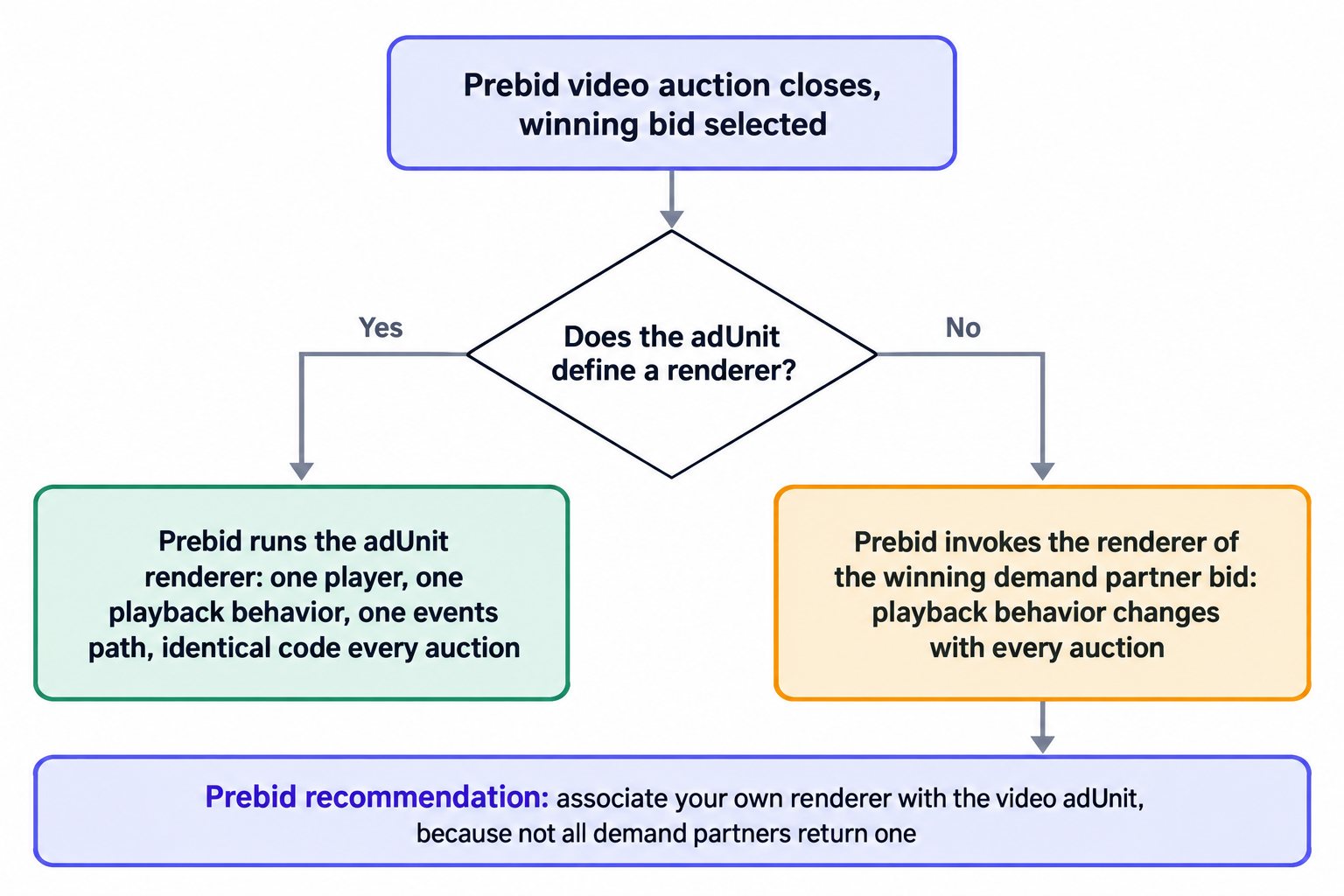
A video bid arrives in two parts: a price, and a pointer to the code that plays the creative. Not all demand partners return a renderer with the bid, and Prebid's position here is specific: associate your own renderer with the video ad unit. If the adUnit carries no renderer, Prebid invokes the renderer of the winning demand partner bid, which means the code that boots your player changes with every auction and you inherit whatever playback behavior that bidder shipped. The Prebid outstream setup guide documents this priority and the adUnit configuration that enforces it.
That inheritance costs more on mobile than on desktop. A partner renderer may not honor the container's aspect ratio, may not expose the pause and resume events your viewability reporting needs, may not lazy-load, and may run its own initialization on a main thread already busy decoding the page. Muted scroll-to-play is the reference behavior for a mechanical reason: mobile browsers allow muted autoplay while sound requires a user gesture, so the muted unit is the one that starts reliably. One renderer per site keeps playback, event reporting, and error handling in a single code path, and keeps each winning bidder's code out of your measurement.
What an own renderer buys you shows up in QA rather than in the auction log. With one renderer you test one playback path: muted start, pause and resume on scroll, completion event, error fallback. You also measure viewability once, against one container spec, instead of reconciling several partner renderers' event payloads at reporting time. When a buyer escalates a discrepancy, the renderer column in your logs answers it in minutes, and that same column catches regressions after a wrapper upgrade immediately rather than as a slow revenue drift.
The placement surface is also wider than most publishers assume. Prebid documents that outstream can be shown on any web page, even pages with only text content, so long-form articles, list pages, and archive templates on mobile can carry a muted scroll-to-play unit without you producing any video at all. The buy side already prices this pattern. Google announced its outstream format on April 17, 2018, built exclusively for mobile environments, where the ad plays muted when it scrolls into view and bills on viewable CPM under MRC viewability standards. A muted, viewability-billed unit inside a text page is the configuration mobile buyers recognize, and it monetizes inventory most publishers leave as static display.
Web and in-app are two traffics, not one
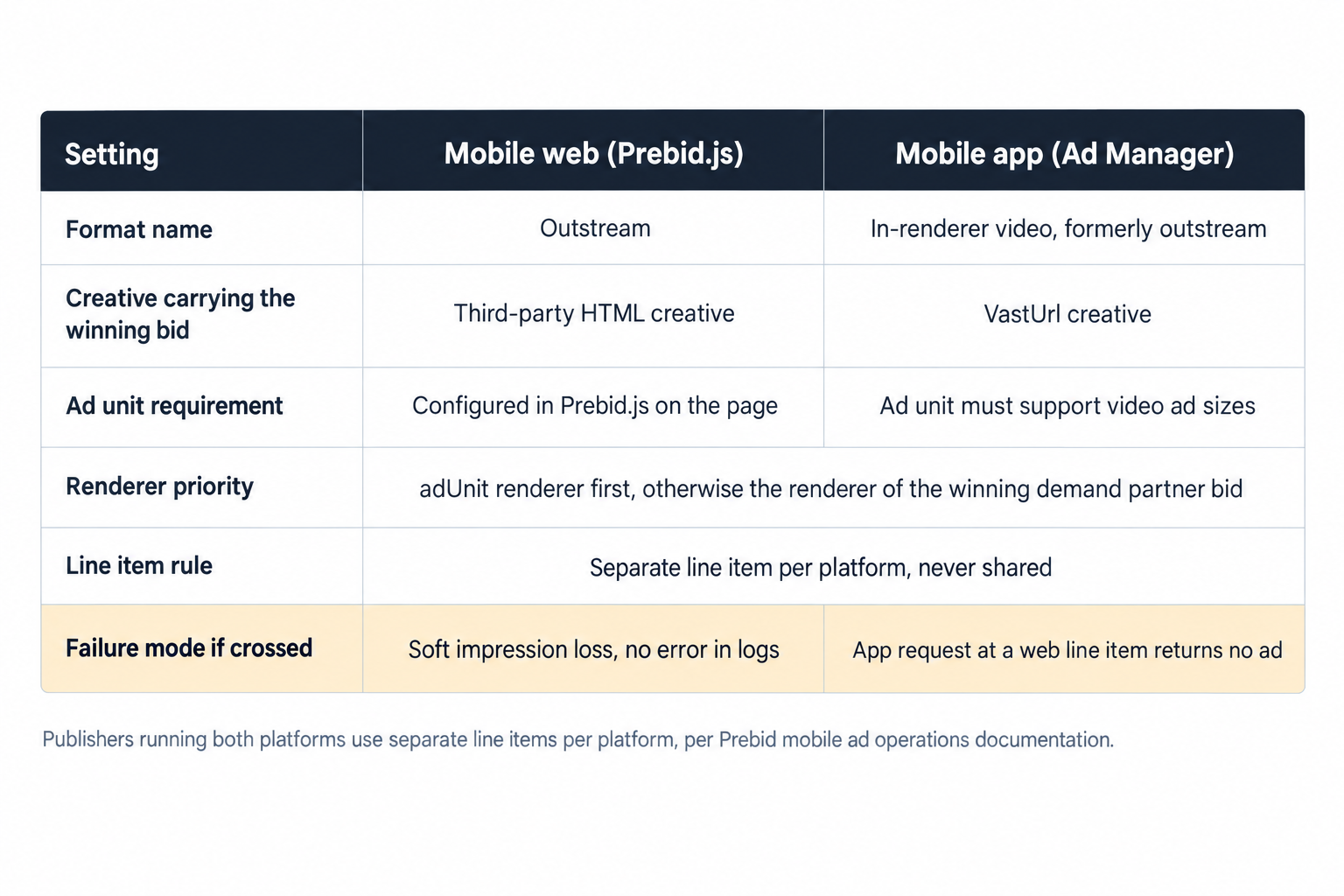
The moment the same format crosses from the mobile web into an app, its plumbing changes. In Ad Manager, in-renderer video, the format formerly called outstream, must be implemented in ad units that support video ad sizes, and the creative that carries the winning bid is a VastUrl creative. Prebid.js on the web works the other way: the winning bid renders through a third-party HTML creative. The two creative types are not interchangeable, and the mismatch fails quietly. An app request routed at a web line item returns no ad, and the gap looks like weak demand in your reports rather than a trafficking error.
Prebid's mobile ad operations documentation states the fix plainly: publishers running both platforms should use separate line items per platform. In practice that means one line item for the web with an HTML creative, one for in-app with a VastUrl creative, each with its own targeting key and reporting label, and nothing that cross-targets. Confirm the in-app ad unit supports video ad sizes before you traffic the creative, because the VastUrl will not serve into a unit that accepts only banner dimensions. The in-app surface also runs past in-renderer video: our mobile advertising coverage spans mobile web and in-app formats from interstitials to rewarded video with device-level reporting, and rewarded video prices and paces differently enough that it warrants its own line item logic.
The timeout arithmetic nobody re-derives
Timeouts decide whether a mobile video setup loses demand or latency, and neither loss writes an error to your logs. The correct numbers are arithmetic rather than taste, and Prebid's documentation states two constraints. First, the s2sConfig timeout should fall within 50 to 75 percent of the auction timeout, and it defaults to 75 percent of the Prebid.js timeout. Second, the Prebid Server timeout should sit 200 to 300 milliseconds below the Prebid.js bid timeout. Both constraints exist for the same reason: the wrapper folds server-side responses into the client auction before it fires the ad server request, and that fold needs the 200 to 300 millisecond margin.
Work an example before touching the config. With an 800 millisecond Prebid.js timeout, the s2sConfig timeout belongs between 400 and 600 milliseconds, at or below the 75 percent default of 600, and Prebid Server should answer within 500 to 600 milliseconds, which is the 200 to 300 millisecond gap under the client timeout. The failure modes on either side stay silent. A server timeout equal to the client timeout means bids that arrive after the auction has closed, and you pay for those requests anyway. A server timeout cut far below the client timeout disarms the demand path that responds fastest.
The case for running server-side video demand at all is mechanical as well. Prebid Server reduces latency by running the auction server-side, letting the user's device focus on delivering content, and it supports web, mobile app, AMP, native, and video including OTT. On mobile, where the main thread is the bottleneck, that division of labor is the entire point: the phone renders the page while a datacenter runs the auction.
Caching is the second half of the server-side decision, and the two toggles serve different setups. Server-side bid caching mainly serves Prebid Mobile setups where bids are not cached client-side, which is the common case in-app. Video caching mainly serves players that need a URL returning VAST XML rather than a raw bid payload, which is the common case when a player or mediation layer consumes a tag directly. Turn on bid caching if you run Prebid Mobile without client-side caching, and turn on video caching if your player reads a VAST URL.
Treat the timeouts as a monitored setting rather than a constant. Log the elapsed time of server-side responses per seat, track the share of auctions that close with a server bid folded in, and check both after any wrapper upgrade, since adapter latency shifts with releases. When you change the Prebid.js timeout, re-derive the two dependent numbers in the same deploy: the s2sConfig window and the server gap. The 50 to 75 percent rule and the 200 to 300 millisecond margin only hold if all three numbers move together.
Which VAST you serve, and where stitching moves the latency
Video demand does not arrive in one shape. We run VAST 2.6 to 4.3 at OnlyMedia, client side or stitched server side (SSAI), and we deliver through XML or JS tags, so the delivery mode decides where auction latency lands. Client-side delivery keeps the auction in the browser, where the renderer and timeout settings above govern it. Stitched delivery inserts the ad into the content stream server-side, which takes the client auction off the playback path but requires the auction to complete before the stitch, pushing the same timeout math upstream. Our video advertising overview covers the full surface, in-stream and out-stream formats, SSAI, pod orchestration, and CTV, and pod logic rewards the same timeout discipline applied at the ad break level.
The responsiveness tax Google scores
The header stack competes with the page for the main thread, and Google scores the result. An INP at or below 200 milliseconds counts as good responsiveness, and Google measures it at the 75th percentile of page loads, split by mobile and desktop. Google's Core Web Vitals guidance names ads and embedded videos among layout shift contributors, so treat your player as a shift suspect until its container proves otherwise. The same guidance identifies breaking up long tasks past 50 milliseconds as a responsiveness improvement, and a stack that initializes adapters, renders a player, and fires VAST tracking in one sequence is exactly the long task it means.
Four moves follow. Reserve every player slot with a fixed aspect-ratio container so the ad never pushes surrounding text. Start the auction near the viewport rather than at page load, so bid requests ride the network while the reader scrolls toward the slot. Break the initialization sequence into tasks shorter than 50 milliseconds so the main thread can handle input between them. Measure mobile and desktop separately, because the 75th percentile split means a passing desktop score tells you nothing about the phone.
Then verify in the field rather than the office. Pull bid response timings per adapter and per device class, and check that the slowest server-side responses land inside the window your timeout math defines. Read CrUX field data split by mobile and desktop, not a lab run on a fast laptop over office wifi. Test the player on a mid-tier Android on a throttled connection, where muted autoplay behavior, gesture requirements, and the 200 millisecond INP target earn or lose their meaning. Log which renderer rendered each impression for a week, because that one column tells you whether the adUnit configuration above is actually in force.
Floors are signals in a bid-shaded auction
On the buy side, first-price auctions with bid shading change what a reserve price does. Buyers shade bids down from your floor as a default, so the floor works as a signal they model rather than a price you collect. Set mobile video floors per format and per surface: an in-renderer unit inside a text article and a pre-roll against short-form content are different products with different completion and dwell profiles, and one blended reserve across both prices the strong placement against the weak one. Our programmatic auction mechanics page covers expected-value ranking, first-price with bid shading, and reserve controls, and reserve strategy per surface is where most of the recoverable yield sits once the technical settings above are correct.
The terms, and why one shop matters
We are OnlyMedia: an ad network, an SSP, and an agency in one company. We work with thousands of publishers, each above one million monthly pageviews, we integrate OpenRTB 2.6 seats alongside Prebid for header and server-side demand, and we pay publishers Net 30, CPM based, no chasing and no sliding terms. The operational point is structural. When the demand seat and the header wrapper answer to one shop, the renderer, the timeout, and the payment terms become one conversation instead of three vendors pointing at each other across an incident thread. Our demand network page lists the curated programmatic demand and the payout terms in full.
The audit, in order
Run these checks as a sequence, because each one gates the next:
- Confirm every video adUnit carries your renderer, so no auction hands playback to a partner's code.
- Confirm in-app ad units support video ad sizes, and that VastUrl creatives sit on in-app line items while HTML creatives sit on web line items, with no cross-targeting.
- Set the s2sConfig timeout inside 50 to 75 percent of the auction timeout, keep Prebid Server 200 to 300 milliseconds below the client timeout, and re-derive both whenever the client timeout changes.
- Enable server-side bid caching for Prebid Mobile setups without client-side caching, and video caching for players that consume a VAST URL.
- Reserve player containers with fixed aspect ratios, break initialization into tasks shorter than 50 milliseconds, and hold INP at or below 200 milliseconds at the 75th percentile, per device class.
- Review floors per format and surface, and treat them as signals in a bid-shaded first-price auction rather than guaranteed prices.
None of these settings is exotic, and that is the uncomfortable part. Mobile video header bidding rarely fails for lack of demand. It fails because the renderer varies with the auction, the line items cross platforms they should not, the timeouts leave the wrapper no margin to fold server bids, or the player initializes in one long task that the reader's scroll has to wait out. Set those four straight, and the demand already bidding on your pages starts paying closer to what it actually costs.