Prebid Video Setup: Maximizing CPMs for Instream and Outstream Assets
Outstream video impressions typically fetch 15 to 20 percent lower CPMs than instream, per a 2022 trade-press briefing citing a media agency's programmatic director. That discount is structural, but most video setups lose more than the structure requires, because buyers price what the bid request says and the bid request often misstates the placement. Three fields carry the truth: mediaTypes.video.context, plcmt, and the renderer attached to each outstream ad unit. Set them accurately and both asset types earn what their environment supports. Set them loosely and you either sell instream inventory at outstream rates or invite a policy correction that reprices the whole line.
The taxonomy that sets the price
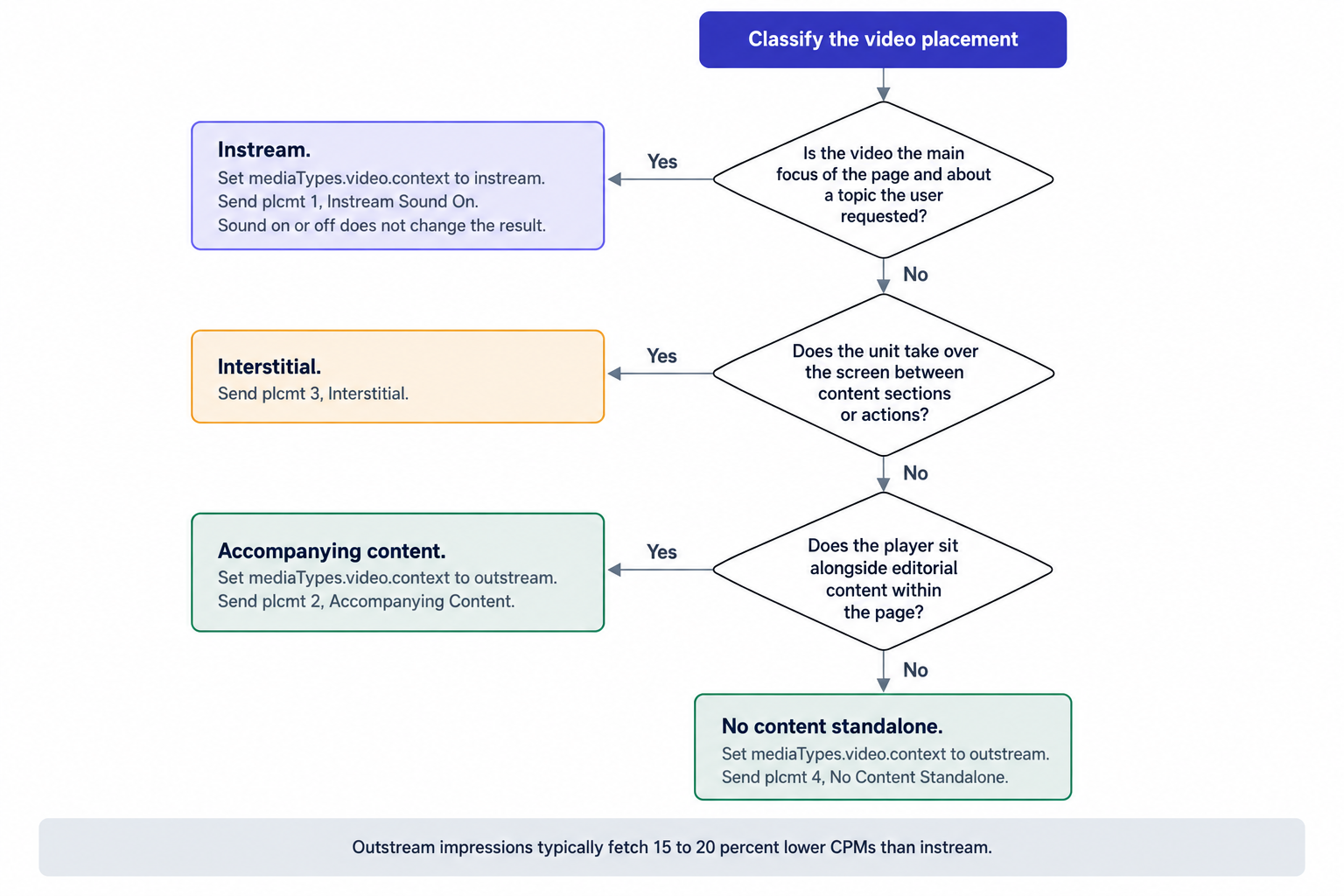
The IAB Tech Lab amended its Ad Format Guidelines for Digital Video and CTV in August 2022, and the amendment redrew the line separating instream from everything else. If the video is the main focus of the page and about a topic the user requested, it counts as instream regardless of sound on or off. The same amendment added a new type, accompanying content, to the taxonomy for video that plays alongside the material the user came for. Sound state no longer decides classification; page focus does.
Buyers act on that taxonomy programmatically. Demand partners filter and bid on the placement value inside the video object, so the value you attach to each ad unit tells the market what you sell. Prebid sample ad units map the plcmt placement values as follows:
- plcmt 1: Instream Sound On
- plcmt 2: Accompanying Content
- plcmt 3: Interstitial
- plcmt 4: No Content Standalone
Audit every video placement against those labels before you write a line of code. A muted autoplay unit mid-article is accompanying content, plcmt 2, whatever the player skin suggests. A standalone player docked in a template slot with no content relationship is no content standalone, plcmt 4. The audit costs hours; a forced reclassification costs quarters of revenue.
One ad unit skeleton, one deciding field
Setting up Prebid ad units is almost the same for instream and outstream: the primary difference is the type of video ad you specify in the mediaTypes.video.context field. Everything else, the player parameters, the cache flow, the ad server hookup, follows one skeleton. That similarity spreads errors: teams clone an instream ad unit, change the context value, and skip the renderer work that outstream requires.
The mediaTypes.video object carries the fields demand partners read before they bid: context, mimes, supported protocols, playback methods, duration bounds, skip behavior, and plcmt. Fill the whole object for every placement, because partners discount or skip requests that arrive with default parameters; a video bid request without playback rules reads as an unknown environment. Set plcmt to match the audit, not the rate you wish the placement earned.
Bid responses usually come back as VAST documents, so Prebid.js sends the VAST XML to a cache so the creative can display if the bid wins in the ad server. Pass the cache ID into your ad server through the Prebid macro on the video creative, so the winning VAST document travels with the tag at delivery. Prebid's video integration walkthrough covers the full flow, including how the cache ID reaches the ad server and how the creative retrieves the document.
Instream units then finish inside the content player: the ad server returns the creative, the player pulls the cached VAST document, and playback runs within the stream the user requested. Long-form instream with pods bids through Prebid's adpod configuration, and pod orchestration belongs on the server side, where stitching turns individual breaks into one stream. Keep one line item per context from day one, so price reporting stays separable instead of untangling a blended line later.
Outstream fails quietly without a renderer
Prebid recommends that publishers associate a renderer with their video ad units, because not all demand partners return a renderer with their video bid responses. With no adUnit renderer, Prebid invokes the renderer associated with the winning demand partner bid. That fallback works until it doesn't: each partner renderer ships its own player, its own autoplay logic and its own error handling, and some bids carry no renderer at all, which surfaces as a won auction with nothing on screen.
Attach one renderer at the adUnit level and hold it to a single playback contract: muted start, pause when the unit leaves view, user-initiated sound. The renderer receives the winning bid, builds the player inside the adUnit's div, and pulls the creative from the cache; everything else, pause behavior, unmute controls, error states, is yours to standardize. Consistent playback produces comparable measurement across partners, and comparable measurement keeps completion rates and error rates legible when you audit demand quality. The official outstream guide walks the renderer configuration and the fallback behavior in full, including the cases where the partner renderer takes over.
One more lever sits in the same adUnit: add a banner mediaType alongside the video object, and display demand competes for the slot whenever video demand is thin, so the placement earns either way. Set a shorter timeout for outstream than for instream, because the unit competes inside scroll behavior rather than before a video start, and long waits push the renderer below the fold before it ever draws.
Where outstream earns its keep
Outstream monetizes pages without a content player, and its economics come from placement and volume rather than from matching instream rates. Three placements hold up in practice: a unit between article paragraphs, a sticky player in the recirculation zone, and an interstitial between list pages. Each carries its own plcmt label and its own buyer pool, so treat them as separate products in reporting even when they share one renderer.
In-article accompanying content earns the steadiest demand of the three because it sits inside reading behavior. Sticky placements trade some completion quality for extra impressions, and interstitials command attention at the cost of interruption fatigue if you cap frequency too loosely. Compare each placement's CPM with the display CPM of the slot it displaced, not with your instream rate card; that comparison tells you whether the video unit justifies its page weight. Where it does not, move the unit before you move the floor.
What Ad Manager requires outside a player
Ad Manager enforces specific behavior for video ads outside a player, and the renderer carries the compliance load. When 50 percent of the ad unit is visible, the video automatically plays muted; when the unit leaves the view, the video automatically pauses. An impression is counted on rendering the first frame. The requirements apply whatever the demand source, so a renderer that satisfies them for one partner satisfies them for all.
The counting rule deserves attention. The impression fires on the first frame, but buyers judge video inventory on completion rate and watch time, and they keep score across campaigns. A renderer that keeps playing off screen inflates impressions today and depresses the quality signal tomorrow, so pause on leaving view is revenue protection, not a nicety. Implement the behavior inside the renderer rather than in page code, so every partner creative inherits it, and verify the 50 percent trigger and the pause on a staging unit before anything ships.
What misclassification costs
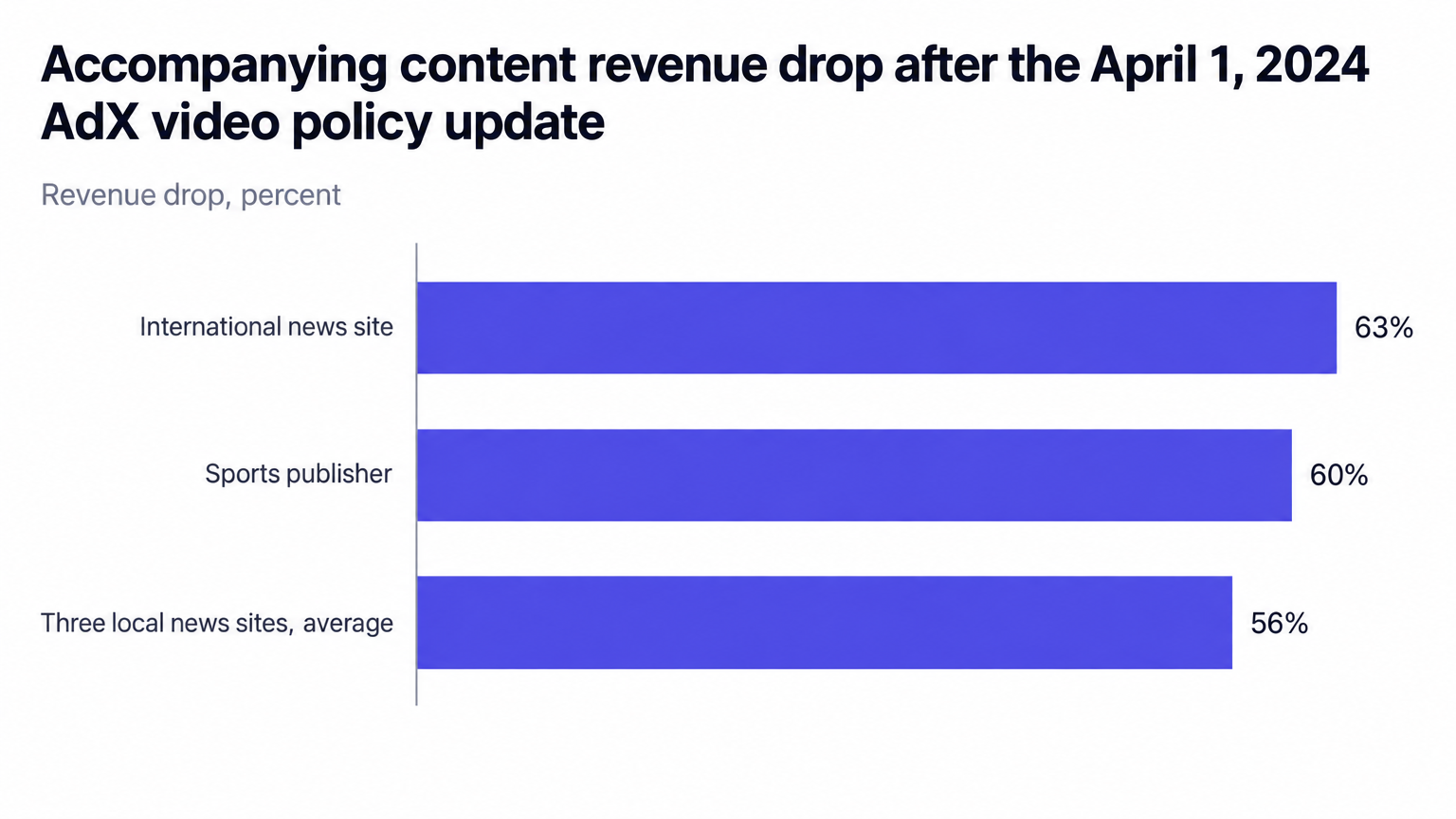
On April 1, 2024, Google AdX updated its video policy to reflect the new industry definitions. Trade press documented the revenue consequences: one international news site saw accompanying content revenue drop 63 percent, a sports publisher dropped 60 percent, and three local news sites averaged 56 percent decreases.
The mechanism is mechanical. A reclassified impression stops matching the demand that paid instream rates and starts matching the demand that pays accompanying content rates, and nothing breaks in the tag; the auction simply reprices. If your mid-article autoplay units report plcmt 1 today, you sit in exactly this position: the rates look good, the exposure is real, and the correction arrives by policy notice rather than by warning. Pull a sample of bid requests per template and read the video object the way a buyer would: context, plcmt, playback methods. Any unit whose label disagrees with the August 2022 definitions carries borrowed rates.
October 22, 2026: two restrictions disappear
Google notified publishers through Ad Manager in October 2026: on October 22, 2026, Google updates the Video Inventory Restrictions. The update removes two requirements: that Accompanying Content load within the body of the page, and that sticky players start in the main content of the page. Until that date both rules stand; after it, neither applies. The same notification keeps one caution in force: video inventory containing restricted content may still receive less advertising than non-restricted content.
Treat the change as placement expansion, not reclassification. Sticky outstream players and accompanying content units that live outside the body of the page become eligible under the restrictions, but eligibility does not raise CPMs; the taxonomy and the demand mix still set the price. Re-test sticky placements after October 22, 2026, keep plcmt 2 on accompanying content wherever it sits on the page, and flag restricted-content inventory separately so the thinner demand the notification warns about never surprises you in the monthly report.
Demand, floors and payout
We are an ad network, an SSP and an agency in one company, and video demand behaves differently depending on who runs the auction. At OnlyMedia we integrate OpenRTB 2.6 seats and Prebid for header and server-side demand, and our in-stream and out-stream video delivery spans VAST 2.6 to 4.3, client side or stitched server side (SSAI), in XML or JS tags, with pod orchestration and CTV in the same stack.
On the sell side, our SSP runs one unified auction per impression, with AdX via MCM, Prebid, OpenRTB seats and managed floors. A single auction matters for video specifically, because parallel auctions make instream and outstream demand bid in separate rooms, and the blended price hides what each context actually earns. Managed floors then apply per context rather than per site, which keeps the structural discount visible and negotiable instead of buried.
Client-side video keeps Prebid in the page, gives you direct control over timeouts and renderer behavior, and suits short instream breaks and nearly all outstream. SSAI stitches the winning creatives into the stream before it reaches the player, which removes client-side latency from the user's path and cuts exposure to client-side blocking, at the cost of running the auction server side. Match the path to the page rather than to the trend: a stitched stream earns nothing on a connection the player cannot sustain, and a client-side auction earns less when slow bid rounds delay the video start.
Run separate line items for instream and outstream in the ad server, so reporting shows the true price of each. The structural 15 to 20 percent discount belongs on the outstream line, where you can manage it, not inside a blended average where it disappears. Price outstream against outstream comps, because instream rates on an accompanying content unit inflate asks, depress fill and hand the buy side reasons to block the placement. Read the two lines against each other every month: if outstream CPMs close on instream CPMs, check what the bid request claims before you celebrate, because buyers may treat an accompanying content unit as instream when plcmt says so, and a correction follows. If instream CPMs sag toward outstream levels, inspect the video object first, because missing playback parameters discount even genuine plcmt 1 inventory.
We work with thousands of publishers, each above one million monthly pageviews, and we pay them Net 30, CPM based, with no chasing and no sliding terms. Our curated programmatic demand network sits behind that schedule, and our ad format coverage spans every IAB display size plus in-stream, out-stream, interstitial and CTV video, so a re-audited video setup scales across formats without a new vendor loop.
Failure modes that cost CPMs
Almost every video revenue complaint reduces to one of six configuration errors, and none involves exotic tooling. These are the errors we filter at OnlyMedia before an integration goes live, and each has a fixed cure:
- Instream context with no cache wiring: the bid wins in the ad server and the creative has no addressable document to load. Wire the cache macro on the creative before the first live impression.
- Outstream adUnit with no renderer: playback defaults to whichever partner wins, and the first rendererless bid renders nothing. Attach the adUnit renderer.
- plcmt 1 on an accompanying content unit: rates rise for a quarter, then a policy correction reprices the line at a loss. Keep plcmt honest.
- Sound-on autoplay outside a player: it breaks the out-of-player requirements and risks restricted treatment. Autoplay muted, every time.
- One line item for all video: the blended CPM hides both the discount and the fill gap. Split instream and outstream.
- Sticky placements parked while the current restrictions stand: schedule the re-test for October 22, 2026 now, with renderer behavior verified first.
None of this requires new tooling. Each fix requires a checklist, a staging unit and about an hour per template.
Sequence the work: classify each placement against the August 2022 definitions, set context and plcmt to match, attach the renderer, wire the cache macro, then test muted autoplay, pause on leaving view and first-frame counting before anything ships. Re-run the audit quarterly and after every policy notification, because pages, players and rules all change without asking. The publishers who held their video CPMs through the April 2024 correction had classified honestly the first time; the ones who lost 63 percent of a line learned the routine from a policy notice instead.