Preparing for the Future of Google MCM: Policy Updates and Best Practices

A Multiple Customer Management Parent answers to Google for every policy violation on the Child Inventory it manages or represents, including violations the Child or a third party caused, and enforcement can reach as far as disabling the Parent's use of MCM. Full liability, without editorial control, sits underneath every delegation decision. MCM is a risk position with demand attached, not a plumbing choice. Preparing for its future means running the program the way the Partner Guidelines already require, and reading the change log closely enough to catch the next requirement before it touches your inventory.
The liability rule that shapes everything
Google's Ad Manager Partner Guidelines set the eligibility conditions plainly. Both the Parent and the Child need an active Ad Manager account in good standing. The Child must own every site in the Child Inventory, including the root domain. And only one Parent can manage, represent or sell any given Child Inventory. Those three conditions close off arrangements that used to pass as normal: leasing a subdomain to an outside operator, monetizing a site the publisher does not own, running the same inventory through two parents.
Liability stacks on top of eligibility. The Parent answers for any and all policy violations on the Child Inventory it manages or represents, whether the Parent, the Child or another party caused them, and Google may respond with enforcement that includes disabling the Parent's use of MCM. Enforcement at the Parent level does not stay scoped to the offending site: disabling MCM ends that monetization path for every Child attached to the Parent. That is why a serious Parent vets child inventory the way a lender vets a borrower, and why a publisher should vet a Parent the same way.
The guidelines also settle a question that still appears in old vendor briefs: Google retired the Seller Program Management program and replaced it with MCM effective February 1, 2022. Any document that still references SPM describes a program that ended years ago. The delegation terms, the liability language and the sellers.json obligations all live under MCM now, so update the paper trail to match.
Where the policy stands in October 2026
As of October 2026, the official Ad Manager policy change log shows no MCM-specific changes for 2026. The operative anchor remains the May 1, 2025 revision: Google implemented new requirements for Connected TV and Digital out-of-home inventory monetized with Google-served ads and added them to the Partner Guidelines as section 2.11. Publishers monetizing CTV apps or DOOH screens with Google-served ads under MCM answer to that section at current scale, not at some future threshold.
The revision also tells you the direction of travel: requirements attach to inventory surfaces beyond the browser. If any Child Inventory touches CTV or DOOH, run a surface census now. List every app package, every device type in delivery reports and every physical screen placement where Google-served ads appear, then map each against the current Partner Guidelines and record the mapping. The census exists to catch inventory nobody re-reviewed: an app build from three years ago, a screen network a Child quietly added. A forgotten surface does not fall outside the guideline that covers it.
For budget and roadmap purposes, treat the Partner Guidelines as the stable contract. They change rarely, in numbered sections, with effective dates, and both sides of a delegation can read the same text and align on it. Absence of newer changes does not mean quiet; it means the burden sits on Parents to prove compliance with what already exists. Three operating rules turn the change log into an early warning system instead of a record:
- Assign one owner, with a recurring review slot on the first business day of each month.
- Log each review in writing: date, sections checked, inventory affected, action items.
- Map every new requirement against current Child Inventory before its effective date, and record the mapping.
A Parent that runs this loop absorbs a policy change as configuration work. A Parent that reads the log after an enforcement notice absorbs it as damage.
Structural rules that decide your setup
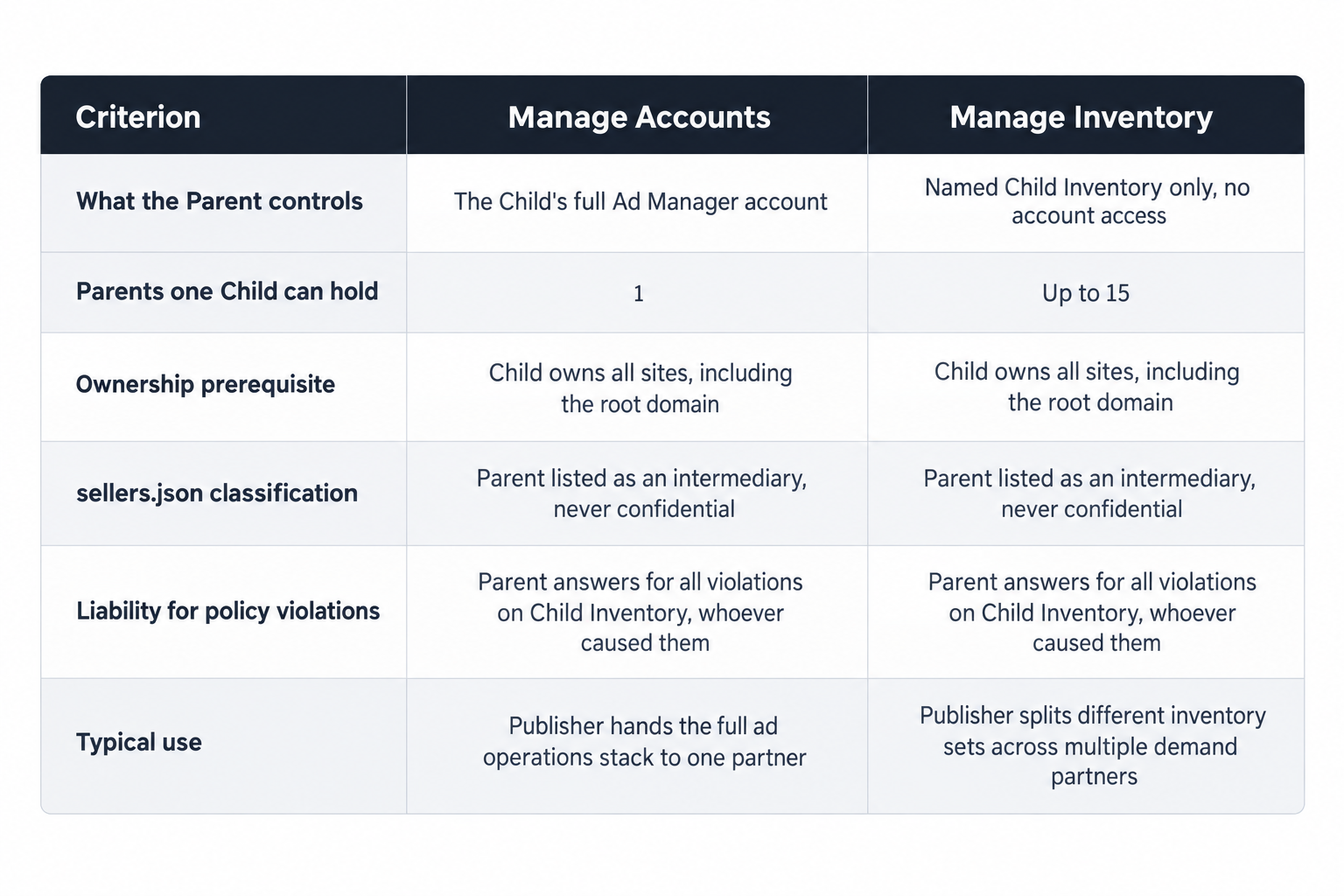
MCM offers two delegation modes, and the choice shapes everything downstream. Manage Accounts hands the Parent control of the Child's Ad Manager account: settings, inventory structure, the full stack. Manage Inventory delegates named inventory only, with no account access. The limits are hard. A Child can hold one Manage Account parent and up to 15 Manage Inventory parents, and each specific Child Inventory maps to exactly one Parent for management, representation and sales. A publisher can therefore diversify demand across up to 15 inventory partners, but no inventory set can carry two parents.
Mechanically, delegation runs through Ad Manager: the Parent invites the Child, the Child accepts and scopes the inventory, and the Parent approves what carries over. Keep a record at each step. The liability rule covers everything you accept, so the approval step is where to verify, not after go-live.
The exclusivity rule decides who can declare your inventory in the open market. Split inventory across several Manage Inventory parents and each parent's declarations must match its own delegation exactly. Overlapping claims create discrepancies that fail supply chain validation on the buy side, where platforms such as The Trade Desk and DV360 check declared sellers before they bid.
sellers.json and ads.txt discipline
Google classifies every MCM Parent as an intermediary in sellers.json and bars the Parent entry from confidential status. The child seller ID must appear both in the Parent's sellers.json and in the Child's ads.txt files, and for Manage Inventory delegations Google documents the workflow for child seller ID submission in Ad Manager Help. Treat the submission as a controlled step rather than a formality: a missing child line breaks the declared chain, and impressions fail validation at the buyer.
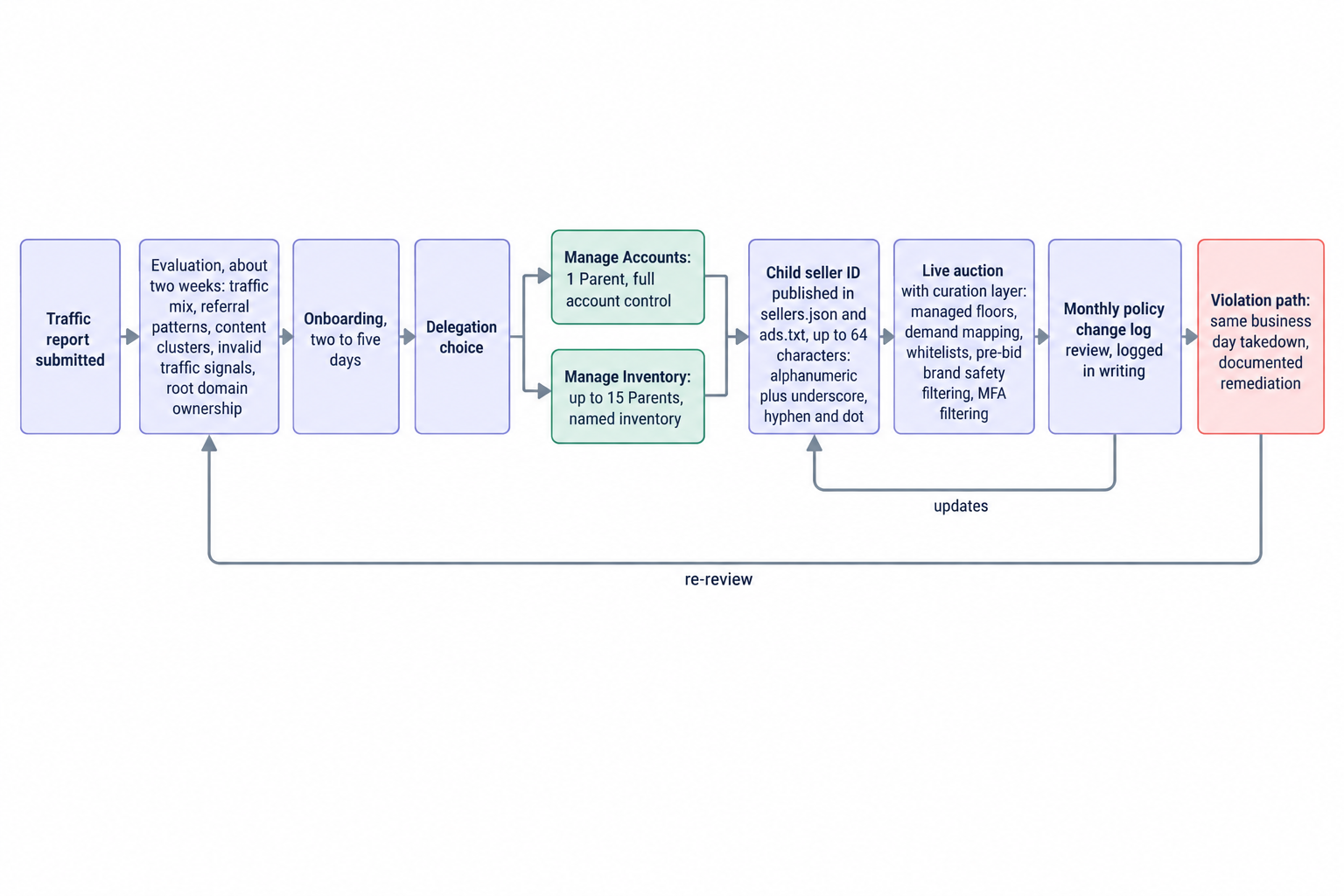
A seller ID can run up to 64 characters: alphanumeric, plus underscore, hyphen and dot. Use a deterministic convention, a company prefix followed by the publisher or site slug, so audits scale. Reconcile sellers.json against ads.txt quarterly and after every delegation change, onboarding or offboarding, and keep both files under version control so a bad edit rolls back in minutes.
Best practices: run MCM like a risk desk
The practices below reflect how OnlyMedia runs MCM across thousands of publishers, each above one million monthly pageviews, as an ad network, an SSP and an agency in one company. None are optional under the liability rule; each exists because a Parent without it carries risk it cannot price.
Underwrite inventory before you attach it. We evaluate new inventory from a traffic report in about two weeks, and onboarding takes two to five days once the inventory clears. The evaluation covers traffic mix by geography and device, referral patterns, content clusters, invalid traffic signals and proof that the Child owns the root domain. Declining inventory is part of the process: the point of underwriting is a portfolio the Parent can defend line by line.
Monitor traffic quality after the door, not just at it. Underwriting catches risk at intake; monitoring catches what develops afterward. Watch for referral pattern shifts, sudden geography concentration, device mix anomalies and CPM movements that do not match content changes. Any of those can precede a policy problem, and each deserves a documented follow-up before it becomes an enforcement item.
Put filtering in front of the auction. Managed floors, demand mapping, whitelists, pre-bid brand safety filtering and MFA filtering aligned with the IAB Content Taxonomy belong before the auction, not after the invoice. We run pre-bid screening on every impression across the inventory we represent, because the Parent's eligibility depends on what the auction serves, not on what the site intended. Made-for-advertising pages carry double risk: buyers block them on their own lists, and they attract the scrutiny that lands on the Parent.
Keep one auction per impression. Duplicate demand paths on the same impression multiply the surfaces where a policy problem can appear and muddy attribution when one does. Our SSP runs AdX via MCM, Prebid and OpenRTB seats into one unified auction per impression, with managed floors, so each impression sells once, through one declared chain, under one set of seller IDs.
Contract for the liability you carry. Sign every Child to terms that mirror the Partner Guidelines: the Child warrants ownership of the root domain, commits to same business day takedown on flagged pages, indemnifies the Parent for violations the Child causes and grants audit rights over traffic sources. A contract that does not mirror the guideline structure leaves the Parent holding unpriced risk.
Choose the delegation deliberately. Manage Accounts suits publishers handing the full stack to one partner: one Parent, full account control. Manage Inventory suits demand diversity: up to 15 parents, each with its own inventory set and its own declarations. Decide the mode at onboarding; the wrong mode surfaces later as either a bottleneck or a compliance discrepancy.
Audit the files on a schedule. Quarterly reconciliation, plus a re-check after every delegation change, keeps sellers.json and ads.txt aligned with reality. Version control both files and treat an unexplained line as an incident, because unauthorized lines in ads.txt are how spoofed inventory borrows a publisher's identity.
If you advise publishers rather than run a Parent, invert the checklist. Ask any prospective Parent five questions: who owns the change log review, what runs pre-bid against your inventory, which seller ID scheme will represent you, what the remediation workflow looks like when a violation lands, and when payments post. A Parent with fast, specific answers runs a risk desk. A Parent that answers in generalities runs a volume desk, and you will share its enforcement exposure.
Payment terms double as a risk signal. A Parent that pays slowly usually monitors slowly, because both failures come from the same weak operations. Net 30, CPM based terms with no sliding conditions set the baseline at this scale; weaker terms price the Parent's risk into your own receivables.
How we run MCM
OnlyMedia operates as an ad network, an SSP and an agency in one company, and on the supply side we run Google Ad Manager, AdX and MCM for our publisher partners. We pay publishers Net 30, CPM based, with no sliding terms and no payment chasing. The demand comes from our curated programmatic demand network, and a curation layer sits in front of the auction: managed floors, demand mapping, whitelists, pre-bid brand safety filtering and MFA filtering aligned with the IAB Content Taxonomy.
The stack exists because the liability rule demands it. Payments post on fixed terms, and publisher monetization with Net 30 payments pairs with a reporting console that refreshes every ten minutes, so Child publishers see the numbers we see at the cadence we see them. Transparency inside a Parent relationship is the fastest way to catch a policy problem while it is still a reporting anomaly. Running all three roles in one company also removes the gap between the team that prices inventory and the team that answers for it: the same desk underwrites the risk it sells.
What to watch, and how to stay ready
Predicting specific future changes would be guessing, and guessing is not a plan, so anchor on what the record shows. Since replacing SPM with MCM on February 1, 2022, Google has framed partner obligations as numbered guidelines with enforcement consequences. The May 1, 2025 revision added section 2.11 and moved the requirement surface beyond the browser, onto Connected TV and Digital out-of-home inventory monetized with Google-served ads. Two patterns hold across that record: requirements arrive by inventory surface, and they arrive in writing, in the change log, with effective dates ahead of enforcement.
Plan against those patterns instead of against rumors:
- Treat any Child Inventory touching a new surface, CTV apps, DOOH screens, new video formats, as policy-exposed until you map it against the current Partner Guidelines.
- Keep an auditable trail: delegation records, proof of root domain ownership, a registry of every seller ID, filtering configuration and a violation log with remediation timestamps.
- Re-run the full audit quarterly. Eligibility decays quietly: an Ad Manager account can fall out of good standing, a Child can transfer a domain, content can drift into categories nobody re-reviewed.
Transparency pressure runs one way. Google already bars MCM parents from confidential status in sellers.json, so every Parent in the chain appears to buyers by name and ID. Buyers want cleaner chains and clearer identifiers, and the change log is where any tightening would appear first. Build the seller ID registry so it can answer stricter questions without a restructure.
For agencies structuring publisher deals, the exclusivity rule is the boundary condition. One Parent per Child Inventory is the guideline structure, not a preference. Use Manage Inventory, with its ceiling of 15 parents, to diversify demand by inventory set, and keep each set's sellers.json and ads.txt lines aligned with the one Parent that controls it.
The next requirement will arrive the way section 2.11 did: a numbered addition to the Partner Guidelines, dated in the change log, scoped to a defined inventory surface. Parents with an owner on the change log, a seller ID registry under version control, filtering in front of the auction and contracts that mirror the liability rules will absorb it as a week of configuration. Parents without that machinery will meet it during an enforcement review. Preparation here is a schedule, not a stance: monthly log review, quarterly file audit, continuous pre-bid screening and a two week look at every new inventory before it attaches to your account.